Me-Page Team
Last modified 3 Sep 2026
Article Plan
- What Is an FAQ Page?
- Why Customers Appreciate FAQs
- An FAQ Page Can Reduce Repetitive Questions
- Use Real Customer Questions
- Organize Questions into Categories
- Keep Answers Clear and Concise
- Use FAQs to Address Customer Concerns
- FAQ Pages Can Support Website Usability
- Add FAQs to Relevant Pages Too
- Make Your FAQ Page Easy to Scan
- Include Links When More Information Is Needed
- Keep Your FAQ Information Accurate
- What Should You Include on an FAQ Page?
- How ME-Page Helps You Create an FAQ Section
- Common FAQ Page Mistakes
- Conclusion
- Frequently Asked Questions about FAQ Sections
When people visit a business website, they rarely arrive without questions. They may want to know how a service works, how much something costs, how long delivery takes, or what they need to do to get started.
If they can't find those answers quickly, they may leave and look somewhere else.
That's where an FAQ page becomes useful. A well-structured FAQ section gives visitors quick answers, removes uncertainty, and makes your website easier to navigate. For many businesses, it can also reduce repetitive customer inquiries and support a smoother customer journey.
Whether you run a local company, online service, agency, or personal brand, an FAQ page can become a valuable part of your business website.

What Is an FAQ Page?
An FAQ, or Frequently Asked Questions, page is a dedicated section where you answer common questions from customers and potential clients.
Questions can cover almost anything relevant to your business, including:
- Products or services
- Pricing
- Ordering
- Delivery
- Payments
- Appointments
- Returns
- Availability
- Contact methods
For example, a photography business might answer questions about booking, turnaround times, image delivery, and cancellation policies.
The goal is simple: give visitors useful information before they have to contact you.
Why Customers Appreciate FAQs
People don't always want to send an email just to ask a basic question.
An effective FAQ page gives customers immediate access to information they may need before making a decision.
It can help visitors:
- Understand your services
- Compare their options
- Prepare for an appointment
- Learn how your process works
- Resolve simple questions
- Decide whether your business is right for them
This creates a more convenient experience and can make your website feel more helpful.
An FAQ Page Can Reduce Repetitive Questions
If customers repeatedly ask your team the same questions, those questions probably belong on your website.
For example, a cleaning company might regularly receive questions about service areas, cancellation policies, and appointment duration.
Instead of answering each question individually, the business can provide clear answers on its website and direct customers to the FAQ page.
Your team can then spend more time handling complex requests rather than repeating the same basic information.
Use Real Customer Questions
One of the best ways to create useful FAQs is to listen to your customers.
Look at:
- Customer emails
- Contact forms
- Support conversations
- Social media messages
- Sales calls
- Reviews
- Questions from existing clients
If several people ask the same thing, that's a strong signal that the information should be easier to find.
Use the language customers actually use rather than rewriting every question in complicated business terminology.

Organize Questions into Categories
A long list of unrelated questions can quickly become difficult to navigate.
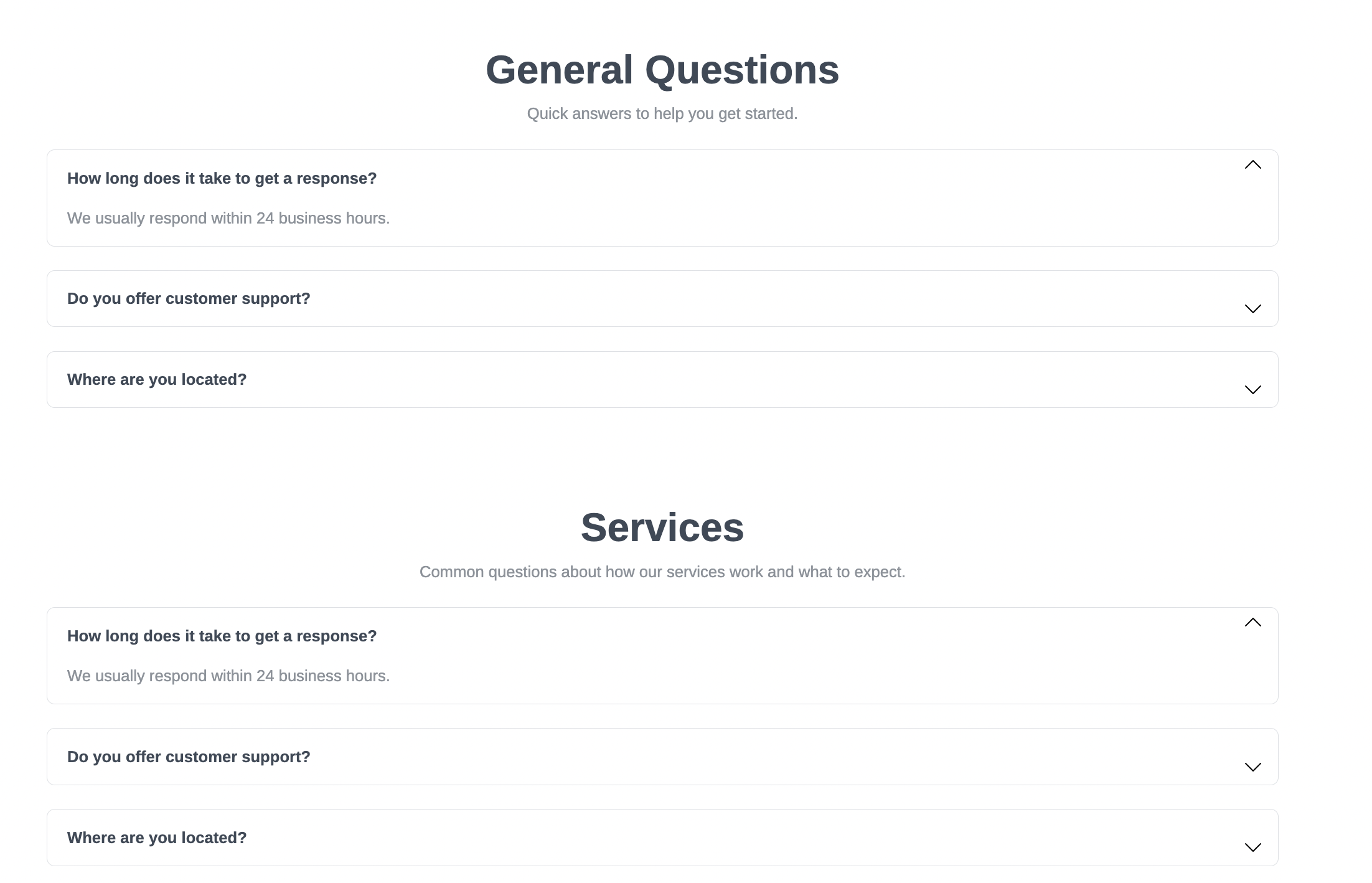
If you have many FAQs, organize them into categories such as:
- General Information
- Services
- Pricing
- Payments
- Orders
- Delivery
- Support
For example, an online store could separate shipping questions from product questions.
This simple organization improves website usability and helps visitors find relevant answers faster.
Keep Answers Clear and Concise
An FAQ answer doesn't need to be an entire article. Give visitors the information they need in a straightforward way.
For example:
How long does delivery take?
Orders are usually delivered within 3-5 business days. Delivery times may vary depending on the destination.
That's often more useful than several paragraphs filled with unnecessary details.
If an answer requires extensive explanation, link to a dedicated page where visitors can learn more.

Use FAQs to Address Customer Concerns
FAQs aren't only for simple informational questions. They can also address concerns that prevent visitors from taking action.
Think about what makes potential customers hesitate.
They may wonder:
- Can I cancel?
- What happens if I need changes?
- Do you offer support?
- Is there a minimum order?
- How does payment work?
- What happens after I submit a request?
Answering these questions openly can reduce uncertainty and help visitors feel more comfortable moving forward.
FAQ Pages Can Support Website Usability
Good website usability means visitors can find and understand information without unnecessary effort.
An FAQ page contributes to this by giving common questions a clear home.
Instead of scattering important information across multiple pages, you can create a central resource and link to it from relevant areas of your website.
For example, a pricing page could link to FAQs about billing, while a service page could direct visitors to questions about the process.
This structure helps visitors move through your website with greater confidence.
It also makes important information easier to access on both desktop and mobile devices.
Add FAQs to Relevant Pages Too
You don't always need to send every visitor to a separate FAQ page.
For important services or products, consider adding a small FAQ section directly to the relevant page.
For example, a consultation service might answer:
- How long is the consultation?
- Can I reschedule?
- What should I prepare?
- How do I book?
A dedicated FAQ page can contain broader questions, while individual pages can address questions specific to their topic.
Make Your FAQ Page Easy to Scan
Visitors should be able to find answers quickly.
Use:
- Clear question headings
- Short answers
- Categories
- Bulleted lists
- Links to relevant pages
- Plenty of white space
Expandable FAQ elements can also help keep longer pages organized by allowing visitors to open only the questions they're interested in.


Include Links When More Information Is Needed
Sometimes an FAQ answer should point visitors toward a more detailed resource. For example:
Where can I learn about your services?
Explore our Services page for a complete overview of available options.
You can link to:
- Detailed Services page
- Pricing page
- Contact page
- Booking page
- Shipping or Delivery page
- Support page
- Relevant blog post
- Downloadable guide
This creates useful connections between your pages and encourages visitors to continue exploring your website.
Keep Your FAQ Information Accurate
An FAQ page is only useful when the information is current.
Review your answers whenever you change:
- Prices
- Services
- Policies
- Business hours
- Delivery options
- Payment methods
- Booking processes
Outdated information can create confusion and may damage customer trust.

What Should You Include on an FAQ Page?
How ME-Page Helps You Create an FAQ Section
ME-Page makes it easier to organize website content into clear sections and connected pages.
You can create a dedicated FAQ page or add FAQ content to relevant pages such as Services, Pricing, Products, or Contact. This gives visitors multiple ways to find important information while keeping your website organized.
With ME-Page, you can:
- Create a dedicated FAQ page.
- Add FAQ sections to Services, Pricing, Products, or Contact pages.
- Organize questions into clear categories.
- Update answers as your business changes.
- Add new questions based on recurring customer concerns.
As your business grows, you can also add new questions based on the issues customers ask about most frequently.
Common FAQ Page Mistakes
Avoid these common problems:
- Answering questions nobody asks
- Writing extremely long answers
- Using complicated language
- Mixing unrelated questions together
- Hiding important information
- Leaving outdated answers online
- Turning every answer into an advertisement
- Forgetting to link to useful pages
- Creating an FAQ without a clear structure
A useful FAQ should feel like a helpful conversation with your customer.

Conclusion
A well-designed FAQ page does more than answer a list of questions. It helps visitors find information faster, reduces uncertainty, improves website usability, and can reduce the number of repetitive questions your team receives.
For any business website, FAQs can become an important part of the customer journey. When you use real customer questions, provide clear answers, and keep the information updated, your website becomes a more useful resource for both new and existing customers.
With ME-Page, you can organize FAQ content into dedicated pages or add relevant questions to different sections of your website. This makes it easier to give visitors the information they need while keeping your website clear, professional, and easy to navigate.
Frequently Asked Questions about FAQ Sections
If your business receives many customer questions, adding an FAQ link to the main navigation can make important information easier to find. For smaller websites, placing the link in the footer or on relevant pages may be enough.
Was This Article Helpful?
Click on a star to rate it!
Average Rating: 4.5/5
Voutes: 2
Share with Friends:


Previous
Best Homepage Sections Every Small Business Website Should Include
Next
How to Choose the Right Website Structure for Your Project
Recent Articles
Everything You Need to Know About Using ME-Page Constructor for Your Website.

How to Optimize Page URLs for Better SEO
A website URL might look like a small technical detail, but it can influence how people understand your conten...
How to Design a Website Footer That Improves User Experience
A website footer might be the last thing visitors see, but that doesn't make it unimportant. When people reach...

How to Link Pages Together for Better Website Navigation
A multi-page website gives you more room to organize information, but adding pages is only half the job. Visit...

Build a Personal Website That Stands Out in 2026
Your social media profiles can show what you do, but they do not give you complete control over your online pr...

Managing Multiple Websites from One ME-Page Account
Running more than one website used to be complicated. Different logins, scattered tools, and endless switching...
How to Organize Content Across Multiple Website Pages
A multi-page website gives you room to explain your business, services, products, and ideas without putting ev...
How to Optimize Page URLs for Better SEO
A website URL might look like a small technical detail, but it can influence how people understand your conten...
How to Design a Website Footer That Improves User Experience
A website footer might be the last thing visitors see, but that doesn't make it unimportant. When people reach...
How to Link Pages Together for Better Website Navigation
A multi-page website gives you more room to organize information, but adding pages is only half the job. Visit...
Build a Personal Website That Stands Out in 2026
Your social media profiles can show what you do, but they do not give you complete control over your online pr...
Managing Multiple Websites from One ME-Page Account
Running more than one website used to be complicated. Different logins, scattered tools, and endless switching...
How to Organize Content Across Multiple Website Pages
A multi-page website gives you room to explain your business, services, products, and ideas without putting ev...










