Me-Page Team
Last modified 1 Oct 2026
Article Plan
- Start With a Clear Personal Brand
- Create a Personal Homepage With a Strong First Impression
- Build an Online Portfolio Around Your Best Work
- Make Your About Page Personal
- Use Visual Design to Support Your Personality
- Add Social and Professional Links
- Make Your Website Easy to Navigate
- Keep Your Content Fresh in 2026
- Use ME-Page to Build Your Personal Website
- Common Personal Website Mistakes to Avoid
- Conclusion
- Frequently Asked Questions
Your social media profiles can show what you do, but they do not give you complete control over your online presence. A personal website gives you one place to present your experience, skills, projects, and personality.
In 2026, a strong personal website does more than list your achievements. It should quickly explain who you are, what you offer, and why someone should continue exploring your site. Whether you are a freelancer, creator, specialist, student, or entrepreneur, your website can become the central point of your personal branding strategy.
The good news? You do not need to be a developer to build one.

Start With a Clear Personal Brand
Before choosing colors or designing your homepage, decide what you want people to remember about you.
Your personal branding should be consistent across your website, social profiles, portfolio, and professional communication. Think about your skills, interests, experience, and the type of opportunities you want to attract.
Ask yourself:
- What do I want to be known for?
- Who do I want to reach?
- What makes my experience different?
- What action should visitors take after viewing my website?
Your answers will help determine what information deserves the most attention.
Create a Personal Homepage With a Strong First Impression
Your personal homepage is usually the first place visitors see, so it should communicate your main message quickly.
Start with your name or professional identity and a short statement explaining what you do. Avoid vague phrases that could describe almost anyone.
For example, instead of simply writing “Designer,” you could say that you are a “UX designer creating simple digital experiences for growing businesses.”
A strong homepage can include:
- Your name and professional title
- A short introduction
- Your main skills or services
- A professional photo
- Selected projects
- Social or professional links
- A clear call to action
The visitor should understand your role within a few seconds.
Build an Online Portfolio Around Your Best Work
If your work can be shown visually or through real examples, an online portfolio should be one of the most important sections of your website.
Do not simply create a gallery of everything you have ever done. Select projects that demonstrate your strongest and most relevant skills.
For each project, explain what you created, what your role was, and what the project achieved when you can share those details.
A simple portfolio structure could include:
This gives visitors context instead of making them guess what they are looking at.
Make Your About Page Personal
Your About page should explain more than your job title.
Share the experience, interests, and values that help visitors understand you as a professional. You do not need to write a long autobiography. Focus on information that is relevant to your goals.
For example, a freelance developer could explain how they entered the industry, what types of projects they enjoy, and which technologies they work with.
A creator might focus on their content journey, areas of expertise, and topics they regularly explore.
The goal is to make your website feel human while keeping the content useful.
Your personal website does not need an extravagant design to stand out.
Instead, choose a visual style that fits your professional identity. A photographer may use large images, while a consultant may prefer a cleaner and more structured layout.
Keep typography readable and make sure there is enough space between sections. Use visual elements to guide attention rather than decorating every part of the page.
Most importantly, check how the website looks on mobile devices. Many visitors will discover your website through a smartphone, social media profile, or shared link.

Your website can act as a central hub for your online presence.
Connect relevant platforms such as LinkedIn, Instagram, GitHub, Behance, YouTube, or other profiles where people can see your work.
Do not add every account simply because you have one. Choose the platforms that support your professional or personal brand.
This makes it easier for visitors to move between your website and other parts of your online presence.
As your personal website grows, you may need more than one page.
A simple structure could be:
Home → About → Portfolio → Services → Contact
You can also add pages such as Blog, Resume, Projects, Testimonials, or Resources when they provide useful information.
ME-Page makes it possible to create multi-page websites with dedicated pages and subpages. You can organize content into a clear hierarchy, create nested navigation, and reuse sections between pages without coding.
This is particularly useful when your personal brand grows and your website needs more space.

Keep Your Content Fresh in 2026
A personal website should not be something you build once and forget.
Update your portfolio when you complete important projects. Review your About page when your career changes. Remove outdated information and replace old examples with stronger work.
You can also add new content through articles, case studies, project updates, or resources.
Regular updates show that your website represents your current professional identity rather than an older version of your career.
Use ME-Page to Build Your Personal Website
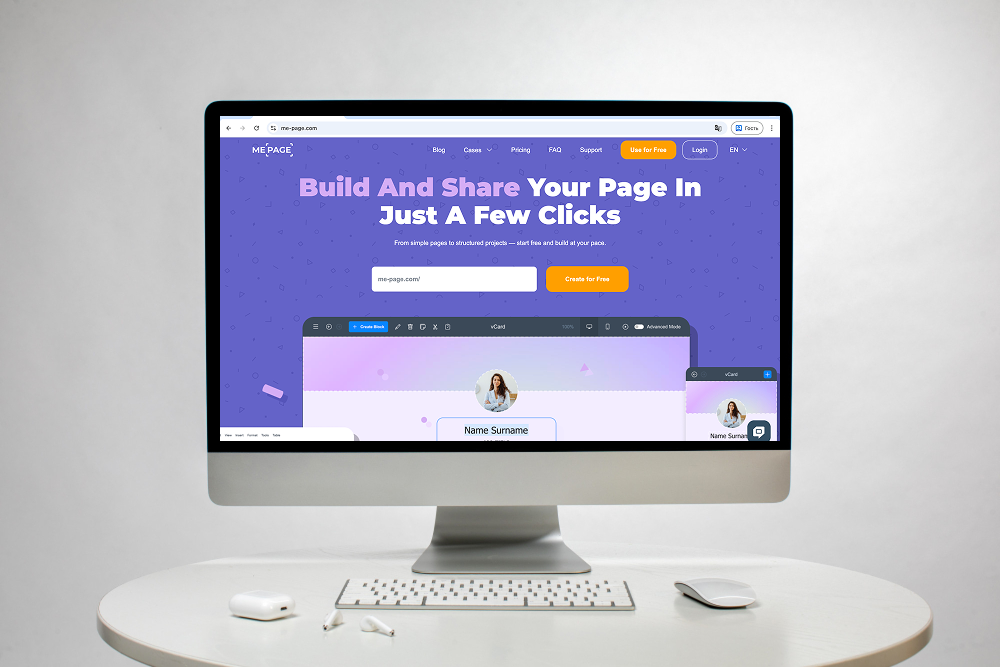
ME-Page provides a no-code way to create and manage a personal website without starting with technical development. Its drag-and-drop builder lets you arrange blocks and page elements quickly, while custom action buttons can help visitors contact you, explore your work, or take another desired action.
If your website grows, the Multi Page Builder lets you organize content across pages and subpages with a clear structure. You can also edit your website from a smartphone or tablet with the Mobile Website Builder, making it easier to manage your site wherever you are.
ME-Page also supports quick editing and publishing, so you can make changes and update your live website without lengthy setup. Built-in analytics can help you understand traffic, clicks, and how visitors interact with your pages.
Together, these features make ME-Page suitable for creating everything from a simple personal homepage to a larger online portfolio.
Common Personal Website Mistakes to Avoid
Even a well-designed website can lose its impact when the content is unclear.
- Too much information: Visitors should not have to read your entire career history to understand what you do.
- Weak introduction: Your homepage needs a clear message instead of a generic statement.
- Outdated portfolio: Old or irrelevant projects can make your website feel neglected.
- Poor mobile experience: Always check your pages on smaller screens.
- No clear next step: Tell visitors what they can do next, whether that means viewing your portfolio, contacting you, or following your work.
Conclusion
A personal website gives you a space that you control. Instead of depending entirely on social platforms, you can create a central destination for your personal branding, professional experience, and online portfolio.
Start with a clear personal homepage, show your strongest work, explain your experience, and make navigation simple. Keep your design consistent and update your content as your career develops.
With ME-Page, you can create and expand a personal website without coding, from a simple one-page introduction to a structured multi-page online portfolio.
In 2026, standing out online is not necessarily about having the most complicated website. It is about making your identity, skills, and work easy to understand.
Frequently Asked Questions
LinkedIn is useful for professional networking, but a personal website gives you more control over how your experience and work are presented. You can organize your portfolio, projects, and personal branding in your own format.
Was This Article Helpful?
Click on a star to rate it!
Average Rating: 5/5
Voutes: 1
Share with Friends:



Previous
Managing Multiple Websites from One ME-Page Account

Next
Welcome to ME-Page: Your Ultimate Website Constructor
Recent Articles
Everything You Need to Know About Using ME-Page Constructor for Your Website.

Build a Personal Website That Stands Out in 2026
Your social media profiles can show what you do, but they do not give you complete control over your online pr...
Managing Multiple Websites from One ME-Page Account
Running more than one website used to be complicated. Different logins, scattered tools, and endless switching...
How to Organize Content Across Multiple Website Pages
A multi-page website gives you room to explain your business, services, products, and ideas without putting ev...

Essential Pages Every Business Website Should Include
A business website doesn't need dozens of pages to look professional. What it does need is a clear structure t...

How to Write Website Headlines That Attract More Visitors
A headline is often the first piece of text people notice when they open a website. Before they read your para...
How Freelancers Can Organize Services, Portfolio, and Contacts on...
Freelancers often wear many hats. One day you're working on a client project, the next you're answering inquir...
Build a Personal Website That Stands Out in 2026
Your social media profiles can show what you do, but they do not give you complete control over your online pr...
Managing Multiple Websites from One ME-Page Account
Running more than one website used to be complicated. Different logins, scattered tools, and endless switching...
How to Organize Content Across Multiple Website Pages
A multi-page website gives you room to explain your business, services, products, and ideas without putting ev...
Essential Pages Every Business Website Should Include
A business website doesn't need dozens of pages to look professional. What it does need is a clear structure t...
How to Write Website Headlines That Attract More Visitors
A headline is often the first piece of text people notice when they open a website. Before they read your para...
How Freelancers Can Organize Services, Portfolio, and Contacts on...
Freelancers often wear many hats. One day you're working on a client project, the next you're answering inquir...










