Me-Page Team
Last modified 26 Sep 2026
Article Plan
- Start With a Clear Website Structure
- Group Related Content on Dedicated Pages
- Create a Content Hierarchy Visitors Can Understand
- Keep Navigation Simple and Consistent
- Use Reusable Sections Across Pages
- Keep Design Consistent Across Website Pages
- Think About URLs and SEO
- Plan Before You Start Adding Pages
- How ME-Page Helps You Build a Structured Website
- Common Mistakes When Organizing Website Content
- Conclusion
- Frequently Asked Questions
A multi-page website gives you room to explain your business, services, products, and ideas without putting everything on one crowded page. But adding more pages is only useful when visitors can easily understand where to go and what each page is for.
Good organization starts with a clear content hierarchy. When you know how your website pages relate to each other, you can create a structure that feels natural to visitors and stays easy to manage as your site grows.
Whether you are building a company website, online portfolio, service website, or product catalog, learning how to organize website content will help you create a better experience for both visitors and search engines.

Start With a Clear Website Structure
Before creating pages, think about the main topics your website needs to cover. Your homepage should introduce the business and guide visitors toward the most important sections.
Instead of placing every detail on the homepage, divide information into logical groups. For example, a service business might have separate pages for Services, About, Pricing, and Contact.
This creates a simple content hierarchy:
- Homepage: Introduces the business and highlights the most important information.
- Services: Explains what you offer and who it is for.
- About: Provides information about the company, team, or professional.
- Pricing: Shows costs, packages, or plans when relevant.
- Contact: Gives visitors a clear way to get in touch.
The goal is simple: every page should have a specific purpose.
Group Related Content on Dedicated Pages
One of the easiest ways to organize website content is to keep related information together.
Imagine a consulting company that offers marketing, branding, and SEO services. Instead of describing all three services in detail on one long page, the company could create a main Services page and separate subpages for each service.
This approach makes website pages easier to scan and gives visitors a direct path to the information they need.
It also makes future updates easier. If your SEO service changes, you can update its dedicated page without searching through a huge homepage or unrelated sections.
Use Subpages for Larger Topics
Subpages are especially useful when one section contains several related topics. A product website, for example, could have:
Products → Category → Individual Product
A company website might use:
Services → Web Design → E-commerce Websites
This creates a logical content hierarchy and helps visitors understand how different pieces of information connect.
ME-Page supports structured pages and subpages, so you can expand your website as your content grows without putting everything into a single layout.

Create a Content Hierarchy Visitors Can Understand
A content hierarchy shows which information is most important and how different pages are connected.
Start with broad topics and move toward more specific information. Your homepage should sit at the top, while more detailed pages and subpages can sit underneath relevant categories.
For example:
This structure prevents your website from becoming a collection of disconnected pages.
Keep Navigation Simple and Consistent
Even well-written content can become difficult to use if visitors cannot find it.
Your main navigation should contain the most important sections of your website. Avoid filling the menu with every single page. Instead, group related pages under clear categories.
For example:
- Home
- About
- Services
- Web Design
- SEO
- Consulting
- Pricing
- Contact
This type of structure lets visitors quickly understand what your website offers.
A multi-page website should also work well on smaller screens. Responsive navigation helps visitors move between pages whether they are browsing from a desktop computer, tablet, or smartphone.
Use Reusable Sections Across Pages
A growing website often contains elements that need to appear in several places. These might include a footer, CTA section, banner, or other repeated content.
Instead of recreating the same section manually on every page, use reusable elements whenever your website builder supports them.
ME-Page provides global sections that can be updated centrally. For example, if you have the same footer or CTA across several subpages, you can edit the original section and apply the changes across the site.
This saves time and helps maintain consistency.


Your pages can have different content without looking like completely different websites.
Use consistent typography, button styles, spacing, and visual elements. Visitors should immediately recognize that they are still on the same website when they move from one page to another.
ME-Page allows you to set global styles and reuse sections between pages. You can also copy and paste structured sections when you want to reuse a particular layout while making page-specific changes.
Consistency is especially important for larger websites with many subpages.
Think About URLs and SEO
Your page structure also affects how search engines understand your website.
Clean, logical URLs can make individual pages easier to understand. A structure such as: example.com/services and example.com/services/web-design
is more meaningful than a collection of confusing or unrelated URLs.
A well-organized multi-page website can also give each page a clearer focus. Instead of trying to rank one page for dozens of unrelated topics, you can create dedicated pages around specific subjects and search intentions.
ME-Page's multi-page functionality includes automatically generated canonical links, clean URL structures, and XML sitemaps to help provide search engines with a clearer site structure.

Plan Before You Start Adding Pages
It is tempting to create a new page every time you have something new to say. But more pages do not automatically make a website better.
Before creating a page, ask:
- Does this topic deserve its own page?
- Who will visit this page?
- What question does it answer?
- Where should visitors find it in the navigation?
- Does it connect naturally to another page?
- Can the content be combined with an existing page?
If the information is short and closely related to another topic, adding another page may only create unnecessary navigation.
How ME-Page Helps You Build a Structured Website
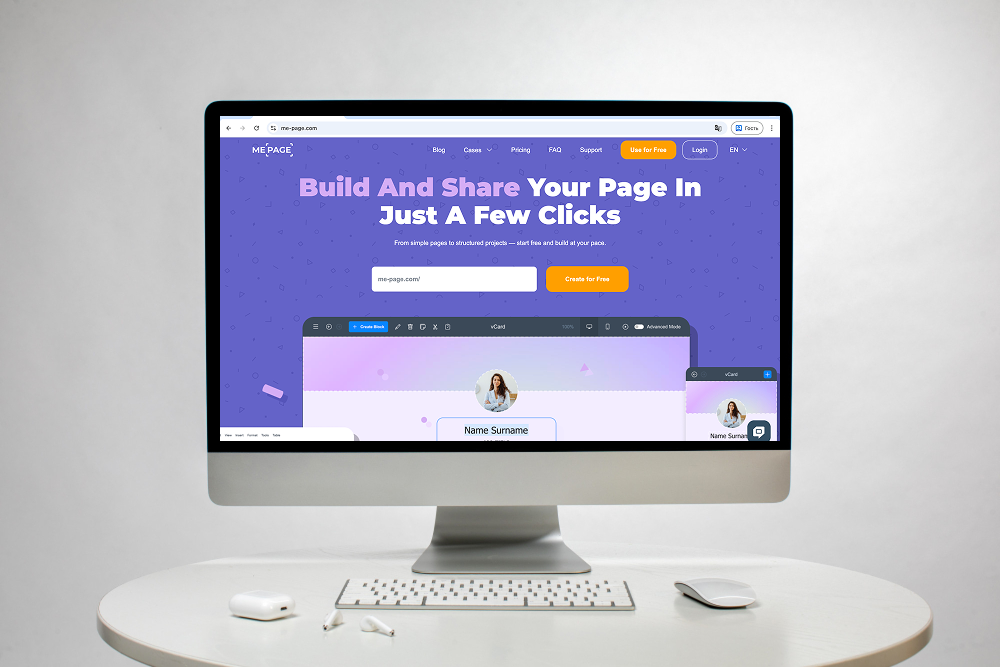
ME-Page makes it easier to expand from a simple website into a more organized multi-page structure. You can add new pages, create nested navigation levels, reuse sections, and maintain consistent styling without coding.
The workflow is straightforward: plan your structure, add your main pages and subpages, organize navigation, and reuse design elements where appropriate.
You can also copy sections between pages, making it faster to build related layouts without starting from scratch each time.
That flexibility is useful when your website starts small but gradually grows into a larger online presence.
Common Mistakes When Organizing Website Content
A few mistakes can make even a professional website difficult to navigate.
- Creating too many pages: Not every small piece of information needs its own URL.
- Using unclear page names: Labels such as “Solutions” or “Resources” may be confusing if visitors cannot tell what they contain.
- Hiding important information: Your key services, contact details, or pricing should not require several clicks to find.
- Ignoring mobile navigation: A structure that works on desktop should remain easy to use on smartphones.
- Mixing unrelated topics: Keep each page focused so visitors know what they will find there.
Conclusion
Organizing content across multiple website pages is mainly about creating a structure that makes sense. Start with broad topics, divide large sections into focused pages, use subpages when necessary, and connect everything through simple navigation.
A clear content hierarchy helps visitors find information faster while making your website easier to maintain as it grows. With ME-Page, you can add structured pages and subpages, reuse sections, apply global styles, and build a multi-page website without coding.
The best multi-page website is not necessarily the one with the most pages. It is the one where every page has a purpose and visitors always know where to go next.
Frequently Asked Questions
There is no universal number. Start with the pages your visitors genuinely need, such as Home, About, Services, and Contact, then add pages as your content and business grow.
Was This Article Helpful?
Click on a star to rate it!
Average Rating: 5/5
Voutes: 1
Share with Friends:



Previous
Essential Pages Every Business Website Should Include

Next
Welcome to ME-Page: Your Ultimate Website Constructor
Recent Articles
Everything You Need to Know About Using ME-Page Constructor for Your Website.

How to Organize Content Across Multiple Website Pages
A multi-page website gives you room to explain your business, services, products, and ideas without putting ev...
Essential Pages Every Business Website Should Include
A business website doesn't need dozens of pages to look professional. What it does need is a clear structure t...

How to Write Website Headlines That Attract More Visitors
A headline is often the first piece of text people notice when they open a website. Before they read your para...

How Freelancers Can Organize Services, Portfolio, and Contacts on...
Freelancers often wear many hats. One day you're working on a client project, the next you're answering inquir...
How to Choose the Right Website Structure for Your Project
Before you choose colors, fonts, images, or buttons for your website, there is one decision worth making first...
Why Every Business Website Needs an FAQ Page
When people visit a business website, they rarely arrive without questions. They may want to know how a servic...
How to Organize Content Across Multiple Website Pages
A multi-page website gives you room to explain your business, services, products, and ideas without putting ev...
Essential Pages Every Business Website Should Include
A business website doesn't need dozens of pages to look professional. What it does need is a clear structure t...
How to Write Website Headlines That Attract More Visitors
A headline is often the first piece of text people notice when they open a website. Before they read your para...
How Freelancers Can Organize Services, Portfolio, and Contacts on...
Freelancers often wear many hats. One day you're working on a client project, the next you're answering inquir...
How to Choose the Right Website Structure for Your Project
Before you choose colors, fonts, images, or buttons for your website, there is one decision worth making first...
Why Every Business Website Needs an FAQ Page
When people visit a business website, they rarely arrive without questions. They may want to know how a servic...










