Me-Page Team
Last modified 17 Sep 2025
Building a website has always been a team effort. Designers, developers, content creators, and managers all have a role to play. But in today’s digital-first world, working together no longer means sitting in the same office. Thanks to tools like ME-Page, you can share website projects and collaborate online with your team no matter where they are.
The best part? You don’t need complicated software or endless back-and-forth emails. ME-Page acts as a team website builder that brings everyone together on one simple, powerful platform.
Why Collaboration Matters in Website Building
The Shift to Online Teamwork
Gone are the days when a website project meant in-person meetings around a whiteboard. Today, remote work and global teams are the norm. Businesses need tools that support this shift, allowing teams to create and manage websites together—even if they’re spread across different time zones.
Benefits of Shared Access
When you share website access with your team, the benefits are huge:
- Speed: Tasks get done faster because multiple people can contribute at once.
- Quality: More eyes on the project mean fewer mistakes and better results.
- Creativity: Collaboration sparks ideas you might never think of on your own.
In short, teamwork makes the process smoother and the final website stronger.
How ME-Page Makes Collaboration Simple
ME-Page isn’t just another website builder. It’s designed with collaboration at its core, making it one of the best tools for teams who want to create faster, together.
Share Website Projects with Ease
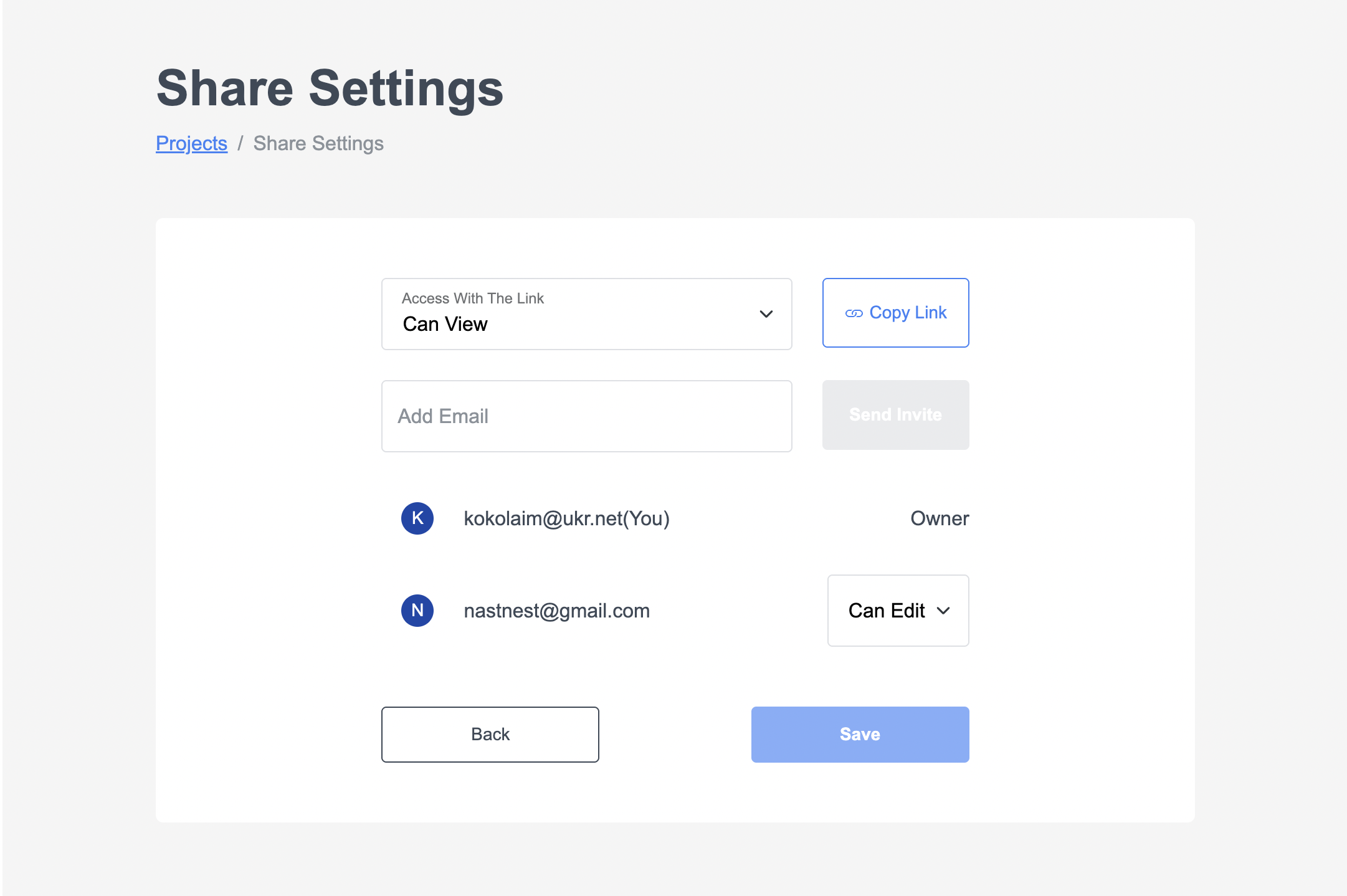
Sharing your project is straightforward with the Share Settings button. Just enter a teammate’s email, and they’ll instantly get access to view or edit, depending on the permissions you set. Everything stays in one place, so your team never has to deal with outdated files or lost versions again.
Work Together in Real Time
Forget waiting for email replies or managing endless file revisions. With ME-Page, multiple people can edit and update the same project at once. This real-time collaboration keeps momentum going and ensures ideas move from concept to execution without delay.
A True Team Website Builder
Unlike traditional tools, ME-Page is built for group projects from the ground up. Each team member can contribute without overwriting someone else’s work, and all changes are visible instantly. The result is a professional, polished site shaped by the entire team — a true collective effort.

Steps to Collaborate Online with ME-Page
So, how do you actually start working together on a project? Here’s a quick walkthrough.
Step 1: Create and Set Up Your Project
Log in to ME-Page and choose a template to start your project. Customize the look and feel of your site so you have a strong foundation before inviting others to join.. A well-prepared setup helps everyone work more efficiently.
Step 2: Invite Team Members
Use Share Settings to give teammates access by entering their email addresses. Once invited, they can log in and start contributing according to their roles — whether it’s design, content, or project management.Step 3: Track Shared Content
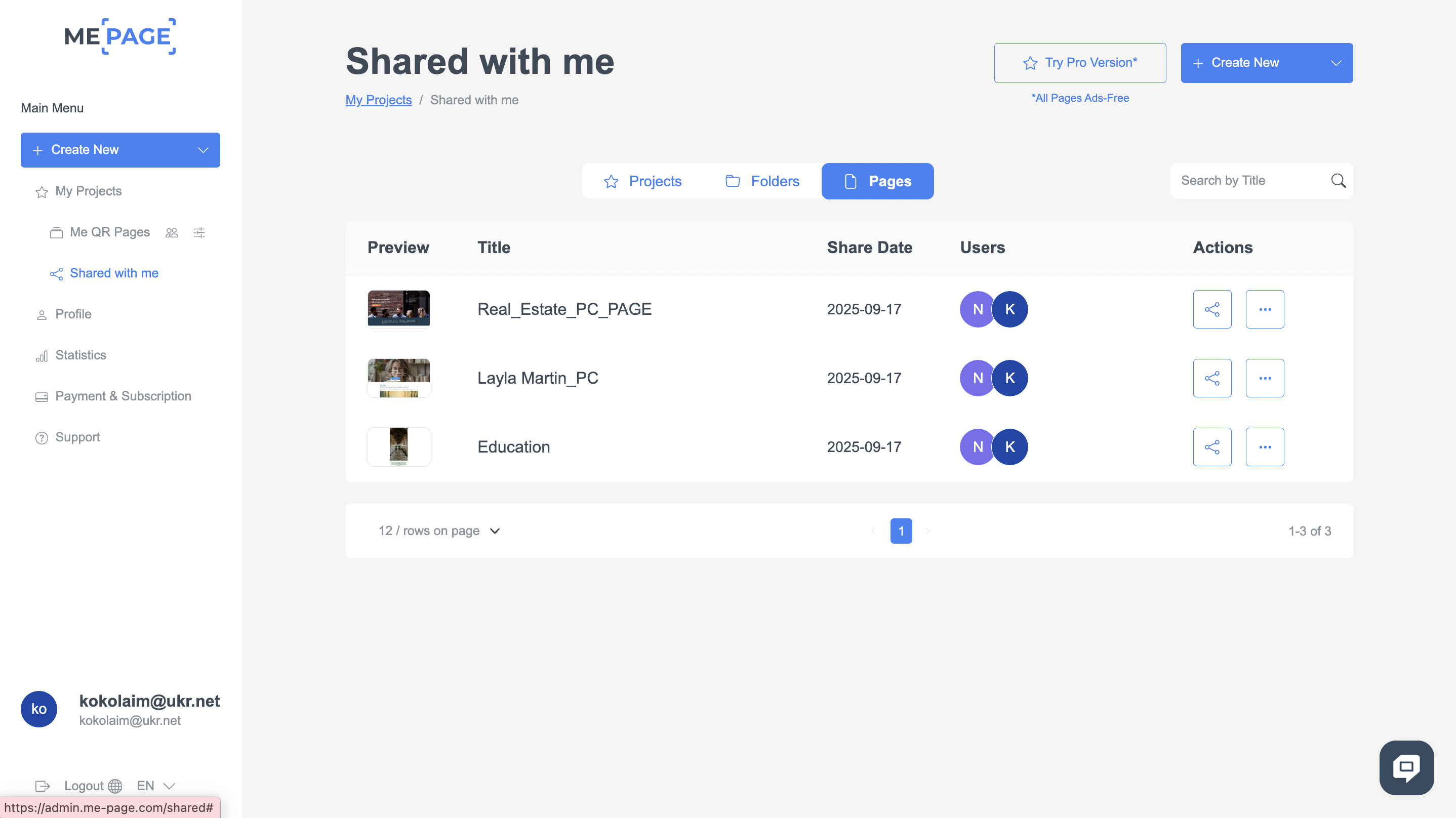
Find all pages, folders, and projects shared with you in Share With Me. This keeps everything in one place and saves time searching through emails or links.
Step 4: Share Progress and Feedback
Once the project is rolling, keep your team updated by sharing previews. They can give feedback in real time, making collaboration smoother and cutting down on unnecessary delays.
ME-Page makes teamwork simple by combining sharing, organization, and feedback in one platform. With Share Settings and Share With Me, you can focus on creating while staying connected with your team.
Tips for Smooth Online Collaboration
To get the best results, keep these practices in mind:

Assign Clear Roles and Tasks
Define responsibilities early on so everyone knows their part — whether it’s handling design, managing content, or reviewing updates. Clear roles prevent overlap, reduce confusion, and help the project move forward without unnecessary delays.
Keep Communication Open
Even with ME-Page as your main workspace, supporting tools like chats, emails, or project boards can keep everyone aligned. A quick message or status update can save hours of rework and keep the team focused on the same goal.
Review and Update Regularly
Don’t wait until the final stage to check progress. Schedule regular reviews to make sure the project is moving in the right direction and to give teammates a chance to share feedback. This steady rhythm keeps the work sharp and collaborative.
Conclusion
Website building doesn’t have to be a lonely task or a messy process filled with endless revisions. With ME-Page, you can share website projects effortlessly, collaborate online with your team in real time, and take advantage of a powerful team website builder that makes the entire process seamless.
Think of ME-Page as your team’s digital workspace. Instead of juggling multiple tools or wasting time on miscommunication, everyone can work together on one platform. From brainstorming ideas to final launch, collaboration has never been this simple.
So if you’re ready to create a polished, professional website without the stress, gather your team and start building on ME-Page today. Because when you collaborate effectively, you don’t just build a website—you build something greater than the sum of its parts.
Was This Article Helpful?
Click on a star to rate it!
Average Rating: 5/5
Voutes: 1
Share with Friends:



Previous
How to Build a Professional Medical Website Easily

Next
How to Create an Online Store with ME-Page Templates
Recent Articles
Everything You Need to Know About Using ME-Page Constructor for Your Website.
How to Link Pages Together for Better Website Navigation
A multi-page website gives you more room to organize information, but adding pages is only half the job. Visit...

Build a Personal Website That Stands Out in 2026
Your social media profiles can show what you do, but they do not give you complete control over your online pr...
Managing Multiple Websites from One ME-Page Account
Running more than one website used to be complicated. Different logins, scattered tools, and endless switching...
How to Organize Content Across Multiple Website Pages
A multi-page website gives you room to explain your business, services, products, and ideas without putting ev...

Essential Pages Every Business Website Should Include
A business website doesn't need dozens of pages to look professional. What it does need is a clear structure t...
How to Write Website Headlines That Attract More Visitors
A headline is often the first piece of text people notice when they open a website. Before they read your para...
How to Link Pages Together for Better Website Navigation
A multi-page website gives you more room to organize information, but adding pages is only half the job. Visit...
Build a Personal Website That Stands Out in 2026
Your social media profiles can show what you do, but they do not give you complete control over your online pr...
Managing Multiple Websites from One ME-Page Account
Running more than one website used to be complicated. Different logins, scattered tools, and endless switching...
How to Organize Content Across Multiple Website Pages
A multi-page website gives you room to explain your business, services, products, and ideas without putting ev...
Essential Pages Every Business Website Should Include
A business website doesn't need dozens of pages to look professional. What it does need is a clear structure t...
How to Write Website Headlines That Attract More Visitors
A headline is often the first piece of text people notice when they open a website. Before they read your para...










