Me-Page Team
Last modified 3 Nov 2026
Article Plan
- What Are Meta Titles and Meta Descriptions?
- How to Write an Effective Meta Title
- How to Write a Useful Meta Description
- Meta Title vs. Meta Description: Quick Comparison
- Common Metadata Mistakes to Avoid
- How to Check and Improve Your Metadata
- Optimize Your Website with ME-Page
- Conclusion
- Frequently Asked Questions
When people search for something on Google, they usually see a list of results with a clickable title and a short description underneath. These two elements help them decide which page is worth opening. If your website title is unclear or your description doesn't match what visitors are looking for, they may simply choose another result.
That's why writing a good meta title and meta description is an important part of on-page SEO. They help communicate what each page offers, make search results more informative, and encourage relevant visitors to explore your website.
The good news is that you don't need to be an SEO expert to get started. By following a few SEO basics, you can create clear, relevant metadata for every important page on your business website.

What Are Meta Titles and Meta Descriptions?
A meta title, also called a title tag, is an HTML element that describes the title of a webpage. Search engines often use it as the clickable headline in search results, although Google may generate a different title based on the page content.
A meta description is a short summary of what visitors can expect to find on a page. It may appear below the title in search results, helping users decide whether the page matches their needs. Google can also generate its own snippet from the page content instead.
Although these elements look similar, they serve different purposes:
- Meta title: Identifies the main topic of the page and helps users understand its relevance.
- Meta description: Provides additional context and explains why the page may be useful.
Think of the title as the headline and the description as a short introduction. Together, they create a first impression before someone even visits your website.
How to Write an Effective Meta Title
Your title should be descriptive, relevant, and easy to understand. It needs to communicate the page's main topic without sounding like a collection of keywords.
1. Include Your Primary Keyword
Start by identifying the main search phrase you want the page to be relevant for. Include it naturally in the meta title, preferably near the beginning when it fits.
For example, if your page is about building a portfolio website, a suitable title could be:
Portfolio Website Builder: Create Your Online Portfolio
This clearly communicates the topic and includes the primary keyword without unnecessary repetition.
Avoid stuffing multiple variations of the same keyword into one title. Search engine optimization works better when your wording is natural and accurately describes the content.

2. Keep Your Title Concise
Long titles may be shortened in search results, so put the most important information first.
Google doesn't enforce a strict character limit for title tags. Instead, it may truncate titles depending on the available display space, which can vary by device.
As a practical starting point, aim for around 50–60 characters, but don't sacrifice clarity just to meet a specific number.
For example:
- Too vague: Welcome to Our Website
- Too long: The Complete Guide to Creating a Professional Business Website for Your Growing Company
- More focused: How to Create a Professional Business Website
The best title communicates the page's topic quickly and accurately
3. Make Every Page Title Unique
Each important page should have its own descriptive title. Using the same title across your homepage, services page, portfolio, and blog makes it harder for visitors to distinguish between them.
Consider these examples:
|
Page Type |
Example Meta Title |
|
Homepage |
ME-Page: Build Your Website Without Coding |
|
About Page |
About Us: Meet the Team Behind Our Business |
|
Services Page |
Website Design Services for Small Businesses |
|
Portfolio Page |
Our Portfolio: Explore Recent Website Projects |
|
Blog Article |
How to Improve Website Navigation |
Unique titles help communicate the purpose of each page and make your website's search listings more informative.
4. Add Your Brand Name Where It Makes Sense
Including your brand name can help people recognize your business in search results. It's particularly useful for homepage titles and pages where brand recognition matters.
You can place it at the beginning or end, depending on the page and available space.
For example:
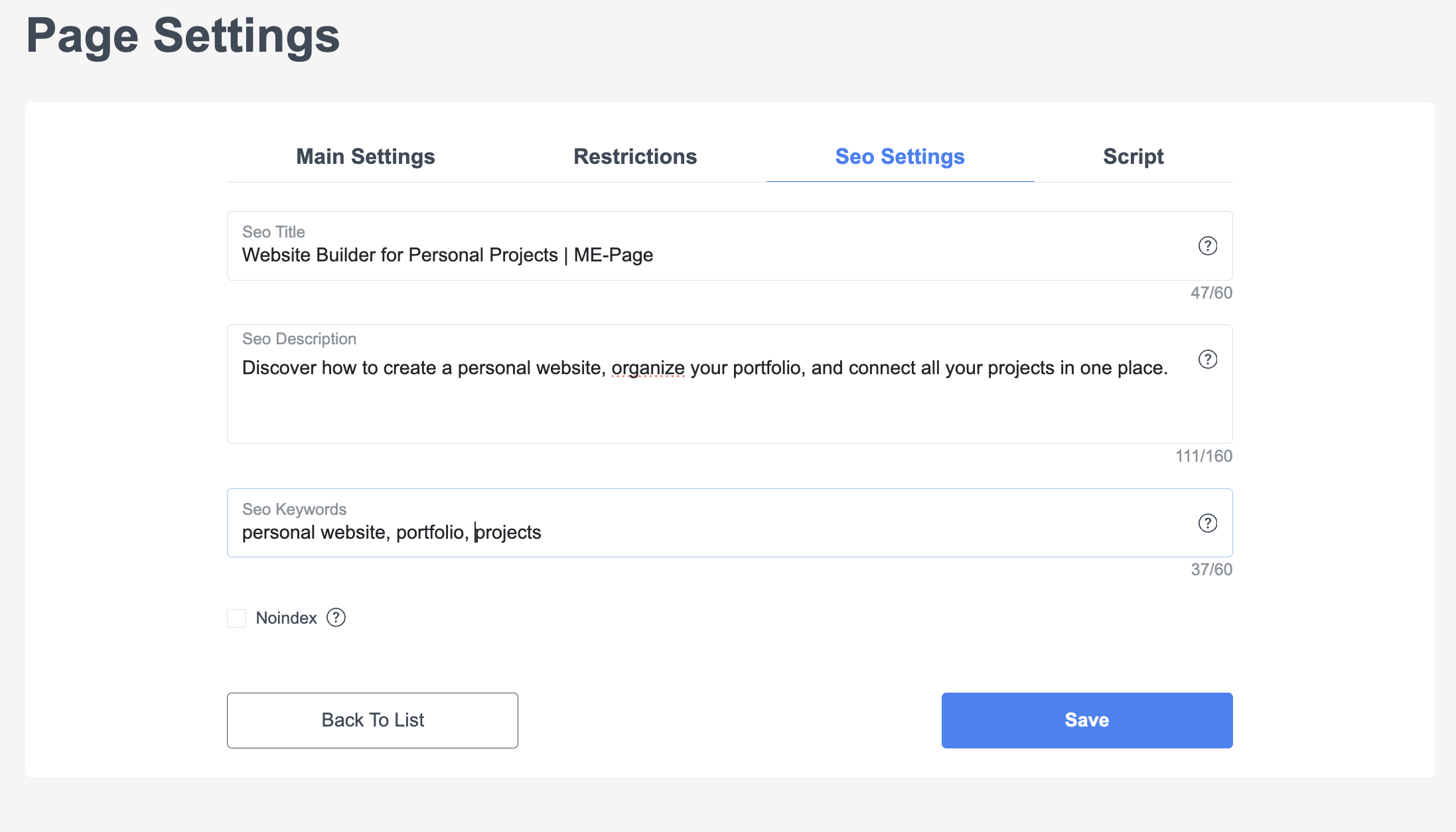
Website Builder for Personal Projects | ME-Page
Don't force your brand name into every title if it makes the wording too long or repetitive. Clarity should remain the priority.
How to Write a Useful Meta Description
A good meta description explains what the page contains and gives visitors a reason to click. It shouldn't simply repeat the title in different words.
1. Summarize the Page Accurately
Describe the main value of the content in one or two clear sentences. Focus on what visitors will learn, discover, or be able to do.
For example, for an article about website navigation:
Learn how to organize website menus, connect pages, and create simple navigation that helps visitors find important information.
This description gives readers a clear idea of what the article covers.
Avoid promising something the page doesn't deliver. If your description mentions a free template, step-by-step tutorial, or special feature, make sure visitors can actually find it on the page.
2. Use Relevant Keywords Naturally
Including your primary keyword in the meta description can help reinforce the page topic and make the snippet more relevant to searchers.
However, Google doesn't use the meta description as a direct ranking factor. Its main purpose is to provide a useful summary that may encourage clicks.
Write for people first. A natural description is more appealing than one filled with repeated search phrases.
3. Give Visitors a Reason to Click
Your description should explain why the page is worth visiting. Depending on the content, you can highlight a practical benefit, an answer to a common question, or a useful resource.
For example:
Discover how to create a personal website, organize your portfolio, and connect all your projects in one place.
This works because it tells visitors what they can expect without making exaggerated promises.
You can also use a gentle call to action when it fits:
- Learn how to...
- Explore practical tips for...
- Discover the key steps to...
- Find out how to...
Avoid making every description sound like an advertisement. The wording should match the tone and purpose of the page.
4. Keep the Description Focused
A practical starting point is around 150–160 characters, although Google doesn't impose a fixed character limit. Search snippets can be shortened or rewritten depending on the query and device.
Put the most useful information near the beginning. If the description is shortened, visitors should still understand the page's main topic.
Meta Title vs. Meta Description: Quick Comparison
Remember that these character ranges are guidelines, not strict SEO requirements. Google may display different text depending on the search query, device, and available space.
Common Metadata Mistakes to Avoid
Even small metadata mistakes can make your website less informative in search results. Watch out for these issues:
- Duplicate titles and descriptions: Avoid copying identical metadata across unrelated pages.
- Keyword stuffing: Repeating search phrases makes titles and descriptions difficult to read.
- Misleading promises: Your metadata should accurately reflect the content visitors will find.
- Generic wording: Titles such as “Home” or “Our Services” provide little context on their own.
- Missing metadata: Important pages should have descriptive title tags and useful summaries.
- Overusing your brand name: Repeating your company name at the expense of the actual page topic can make titles less effective.
Review metadata whenever you publish a new page or significantly change its content.

How to Check and Improve Your Metadata
Writing metadata is only the first step. You should also review how your pages appear in search results and whether your titles and descriptions accurately represent the content.
Here are a few practical ways to do that:
- Create a metadata list. Record the URL, page title, meta description, and primary keyword for each important page.
- Check for duplicates. Look for pages that use identical or overly similar titles and descriptions.
- Review Google Search Console. Use its Performance report to explore search queries, impressions, clicks, and click-through rates.
- Identify opportunities. Pages with many impressions but relatively few clicks may benefit from clearer or more relevant titles and descriptions.
- Monitor changes. After updating metadata, give search engines time to recrawl your pages before evaluating the results.
Don't assume that every page with a low click-through rate needs a new title. Search intent, ranking position, competition, and the actual search results also influence user behavior.
Optimize Your Website with ME-Page
When building a website with ME-Page, think about metadata as part of your overall content planning. Each page should have a clear purpose, a descriptive heading, and content that matches what visitors expect to find.
ME-Page's no-code builder makes it easier to create and organize website content without technical development. With the Multi Page Builder, you can structure your website into pages and subpages, giving different topics their own dedicated space.
When preparing SEO metadata, focus on making every page distinct and relevant. If your website includes a homepage, services, portfolio, and blog, each should communicate its own purpose rather than relying on generic titles.
Review the SEO settings available in your ME-Page editor to configure page metadata, and check the published result to make sure your titles and descriptions are displayed as intended.
Conclusion
Meta titles and meta descriptions may be small elements of a webpage, but they play an important role in how your content is presented in search results. Clear titles help visitors recognize relevant pages, while useful descriptions give them more context before clicking.
Start with your primary keyword, write unique titles, summarize each page accurately, and avoid unnecessary repetition. Then use Google Search Console to monitor how your pages perform and identify opportunities for improvement.
These SEO basics are a practical part of on-page SEO and a useful habit for anyone managing a business website. With thoughtful search engine optimization, you can make your pages easier to understand and create better first impressions for potential visitors.
Frequently Asked Questions
Yes. Google may generate a different title link or snippet when it believes another part of the page better matches a user's search. This is why your visible headings and page content should remain consistent with your metadata.
Was This Article Helpful?
Click on a star to rate it!
Average Rating: 5/5
Voutes: 2
Share with Friends:



Previous
How to Create an Effective Services Page for Your Business

Next
Welcome to ME-Page: Your Ultimate Website Constructor
Recent Articles
Everything You Need to Know About Using ME-Page Constructor for Your Website.
How to Write SEO-Friendly Page Titles and Meta Descriptions
When people search for something on Google, they usually see a list of results with a clickable title and a sh...
How to Create an Effective Services Page for Your Business
When potential customers visit your business website, they want to understand what you offer, how you can help...

How to Create a Navigation Menu for a Multi-Page Website
A website can have excellent content, attractive visuals, and useful features, but visitors may still leave if...
One Website, Multiple Pages: When to Expand Your Site
Starting a website with a single page makes sense. You can introduce your business, showcase your work, add a ...

Create a Personal Link Hub with Pages for Every Project
Do you have a portfolio, a personal blog, freelance services, and a few side projects scattered across differe...

How to Optimize Page URLs for Better SEO
A website URL might look like a small technical detail, but it can influence how people understand your conten...
How to Write SEO-Friendly Page Titles and Meta Descriptions
When people search for something on Google, they usually see a list of results with a clickable title and a sh...
How to Create an Effective Services Page for Your Business
When potential customers visit your business website, they want to understand what you offer, how you can help...
How to Create a Navigation Menu for a Multi-Page Website
A website can have excellent content, attractive visuals, and useful features, but visitors may still leave if...
One Website, Multiple Pages: When to Expand Your Site
Starting a website with a single page makes sense. You can introduce your business, showcase your work, add a ...
Create a Personal Link Hub with Pages for Every Project
Do you have a portfolio, a personal blog, freelance services, and a few side projects scattered across differe...
How to Optimize Page URLs for Better SEO
A website URL might look like a small technical detail, but it can influence how people understand your conten...


