Me-Page Team
最終更新 3 Nov 2025
記事プラン
- ブランドにとってカスタムドメインが重要な理由
- ステップバイステップのドメイン統合ガイド
- ME-PageでカスタムURL設定を使用する利点
- カスタムドメイン設定に関するよくある質問
- #blockContent1762268966740-10 .custom-1762268996885-0 { text-align: start } #blockContent1762268966740-10 .custom-1762268996885-1 { font-size: 24px; font-family: Arial } #blockContent1762268966740-10 .custom-1762268996885-2 { font-size: 24px; font-family: Arial; color: rgb(52, 73, 94) } #blockContent1762268966740-10 .custom-1762268996885-3 { color: rgb(0, 0, 0); background: rgba(0, 0, 0, 0) none repeat scroll 0% 0% / auto padding-box border-box; background-color: rgba(0, 0, 0, 0); font-family: -apple-system, 'system-ui', 'Segoe UI', Roboto, Oxygen, Ubuntu, Cantarell, 'Open Sans', 'Helvetica Neue', sans-serif; font-size: 16px; font-weight: bold; font-style: normal; line-height: 22.4px; -webkit-background-clip: border-box } ドメインの接続にはどれくらい時間がかかりますか?
- #blockContent1762269051017-16 .custom-1762268996885-0 { text-align: start } #blockContent1762269051017-16 .custom-1762268996885-1 { font-size: 24px; font-family: Arial } #blockContent1762269051017-16 .custom-1762268996885-2 { font-size: 24px; font-family: Arial; color: rgb(52, 73, 94) } #blockContent1762269051017-16 .custom-1762268996885-3 { color: rgb(0, 0, 0); background: rgba(0, 0, 0, 0) none repeat scroll 0% 0% / auto padding-box border-box; background-color: rgba(0, 0, 0, 0); font-family: -apple-system, 'system-ui', 'Segoe UI', Roboto, Oxygen, Ubuntu, Cantarell, 'Open Sans', 'Helvetica Neue', sans-serif; font-size: 16px; font-weight: bold; font-style: normal; line-height: 22.4px; -webkit-background-clip: border-box } #blockContent1762269051017-16 .custom-1762269071221-0 { color: rgb(52, 73, 94); font-family: Arial; font-size: 24px; font-weight: bold; line-height: 33.6px; background: none 0% 0% / auto repeat scroll padding-box border-box rgba(0, 0, 0, 0) } #blockContent1762269051017-16 .custom-1762269071221-1 { color: rgb(52, 73, 94); font-family: Arial; font-size: 24px; font-weight: bold; line-height: 33.6px; background: none 0% 0% / auto repeat scroll padding-box border-box rgba(0, 0, 0, 0) } #blockContent1762269051017-16 .custom-1762269071221-2 { color: rgb(52, 73, 94); font-family: Arial; font-size: 24px; font-weight: bold; line-height: 33.6px; background: none 0% 0% / auto repeat scroll padding-box border-box rgba(0, 0, 0, 0) } #blockContent1762269051017-16 .custom-1762269071221-3 { color: rgb(52, 73, 94); font-family: Arial; font-size: 24px; font-weight: bold; line-height: 33.6px; background: none 0% 0% / auto repeat scroll padding-box border-box rgba(0, 0, 0, 0) } #blockContent1762269051017-16 .custom-1762269071221-4 { color: rgb(52, 73, 94); font-family: Arial; font-size: 24px; font-weight: bold; line-height: 33.6px; background: none 0% 0% / auto repeat scroll padding-box border-box rgba(0, 0, 0, 0) } 検証に失敗した場合はどうなりますか?
- #blockContent1762269053498-22 .custom-1762268996885-0 { text-align: start } #blockContent1762269053498-22 .custom-1762268996885-1 { font-size: 24px; font-family: Arial } #blockContent1762269053498-22 .custom-1762268996885-2 { font-size: 24px; font-family: Arial; color: rgb(52, 73, 94) } #blockContent1762269053498-22 .custom-1762269144974-0 { color: rgb(52, 73, 94); font-family: Arial; font-size: 24px; font-weight: bold; line-height: 33.6px; background: none 0% 0% / auto repeat scroll padding-box border-box rgba(0, 0, 0, 0) } #blockContent1762269053498-22 .custom-1762269144974-1 { color: rgb(52, 73, 94); font-family: Arial; font-size: 24px; font-weight: bold; line-height: 33.6px; background: none 0% 0% / auto repeat scroll padding-box border-box rgba(0, 0, 0, 0) } #blockContent1762269053498-22 .custom-1762269144974-2 { color: rgb(52, 73, 94); font-family: Arial; font-size: 24px; font-weight: bold; line-height: 33.6px; background: none 0% 0% / auto repeat scroll padding-box border-box rgba(0, 0, 0, 0) } #blockContent1762269053498-22 .custom-1762269144974-3 { color: rgb(52, 73, 94); font-family: Arial; font-size: 24px; font-weight: bold; line-height: 33.6px; background: none 0% 0% / auto repeat scroll padding-box border-box rgba(0, 0, 0, 0) } #blockContent1762269053498-22 .custom-1762269144974-4 { color: rgb(52, 73, 94); font-family: Arial; font-size: 24px; font-weight: bold; line-height: 33.6px; background: none 0% 0% / auto repeat scroll padding-box border-box rgba(0, 0, 0, 0) } 技術的な知識は必要ですか?
- #blockContent1762269182414-28 .custom-1762268996885-0 { text-align: start } #blockContent1762269182414-28 .custom-1762268996885-1 { font-size: 24px; font-family: Arial } #blockContent1762269182414-28 .custom-1762269204368-0 { color: rgb(52, 73, 94); font-family: Arial; font-size: 24px; font-weight: bold; line-height: 33.6px; background: none 0% 0% / auto repeat scroll padding-box border-box rgba(0, 0, 0, 0) } #blockContent1762269182414-28 .custom-1762269204368-1 { color: rgb(52, 73, 94); font-family: Arial; font-size: 24px; font-weight: bold; line-height: 33.6px; background: none 0% 0% / auto repeat scroll padding-box border-box rgba(0, 0, 0, 0) } #blockContent1762269182414-28 .custom-1762269204368-2 { color: rgb(52, 73, 94); font-family: Arial; font-size: 24px; font-weight: bold; line-height: 33.6px; background: none 0% 0% / auto repeat scroll padding-box border-box rgba(0, 0, 0, 0) } #blockContent1762269182414-28 .custom-1762269204368-3 { color: rgb(52, 73, 94); font-family: Arial; font-size: 24px; font-weight: bold; line-height: 33.6px; background: none 0% 0% / auto repeat scroll padding-box border-box rgba(0, 0, 0, 0) } #blockContent1762269182414-28 .custom-1762269204368-4 { color: rgb(52, 73, 94); font-family: Arial; font-size: 24px; font-weight: bold; line-height: 33.6px; background: none 0% 0% / auto repeat scroll padding-box border-box rgba(0, 0, 0, 0) } 後で ME-Page ドメインに戻すことはできますか?
- #blockContent1762269184606-34 .custom-1762268996885-0 { text-align: start } #blockContent1762269184606-34 .custom-1762268996885-1 { font-size: 24px; font-family: Arial } #blockContent1762269184606-34 .custom-1762269252286-0 { font-family: Arial; font-size: 24px } #blockContent1762269184606-34 .custom-1762269252286-1 { color: rgb(52, 73, 94) } #blockContent1762269184606-34 .custom-1762269252286-2 { color: #34495e } ドメインとサブドメインの違いは何ですか?
- #blockContent1762269186270-40 .custom-1762269316498-0 { font-size: 24px; font-family: Arial } #blockContent1762269186270-40 .custom-1762269316498-1 { color: #34495e } すでにサブドメインがある場合はどうなりますか?
- まとめ:ウェブサイトを自分らしくする
ウェブサイトをよりプロフェッショナルに見せ、ブランドの信頼性を高めたいですか?それなら、ME-Pageでカスタムドメインを設定するのがおすすめです。yourname.me-page.com のような一般的なアドレスを使う代わりに 、www.yourbrand.comへ訪問者を誘導しましょう。シンプルで信頼性が高く、完全にあなただけのサイトです。
ME-Pageでは、わずか数クリックでウェブサイトのブランディングドメインを簡単に接続できます。複雑なコードや高度な設定は必要ありません。すべてがシンプルにまとめられています。
ブランドにとってカスタムドメインが重要な理由
カスタムURLの設定は単なる見た目のアップグレードではありません。それはあなたのオンラインアイデンティティです。ウェブサイトのアドレスは、デジタル版の店頭看板のようなものだと考えてください。わかりにくくランダムなURLを持つお店を信頼できますか?おそらくそうではないでしょう。
カスタム ドメインを ME-Page サイトに接続すると、次のことが可能になります。
- プロフェッショナリズムの向上:訪問者はあなたのブランドが正当かつ確立されたものであることを即座に認識します。
- SEO の改善:検索エンジンはブランド ドメインを優先するため、サイトのランキングが向上します。
- 信頼の構築:顧客は、ブランド名を反映した Web サイトに興味を持つ可能性が高くなります。
- 共有性の向上:短くパーソナライズされた URL は覚えやすく、共有しやすくなります。
ME-Page を使用すると、プロジェクトに名前を付けて「保存」をクリックするだけで、独自のドメインを接続できます。
ステップバイステップのドメイン統合ガイド
カスタムドメインを接続するのに、専門的な技術は必要ありません。この簡単なドメイン統合ガイドに従えば、ブランドウェブサイトをすぐに公開できます。ステップ1: プロジェクト設定にアクセスする
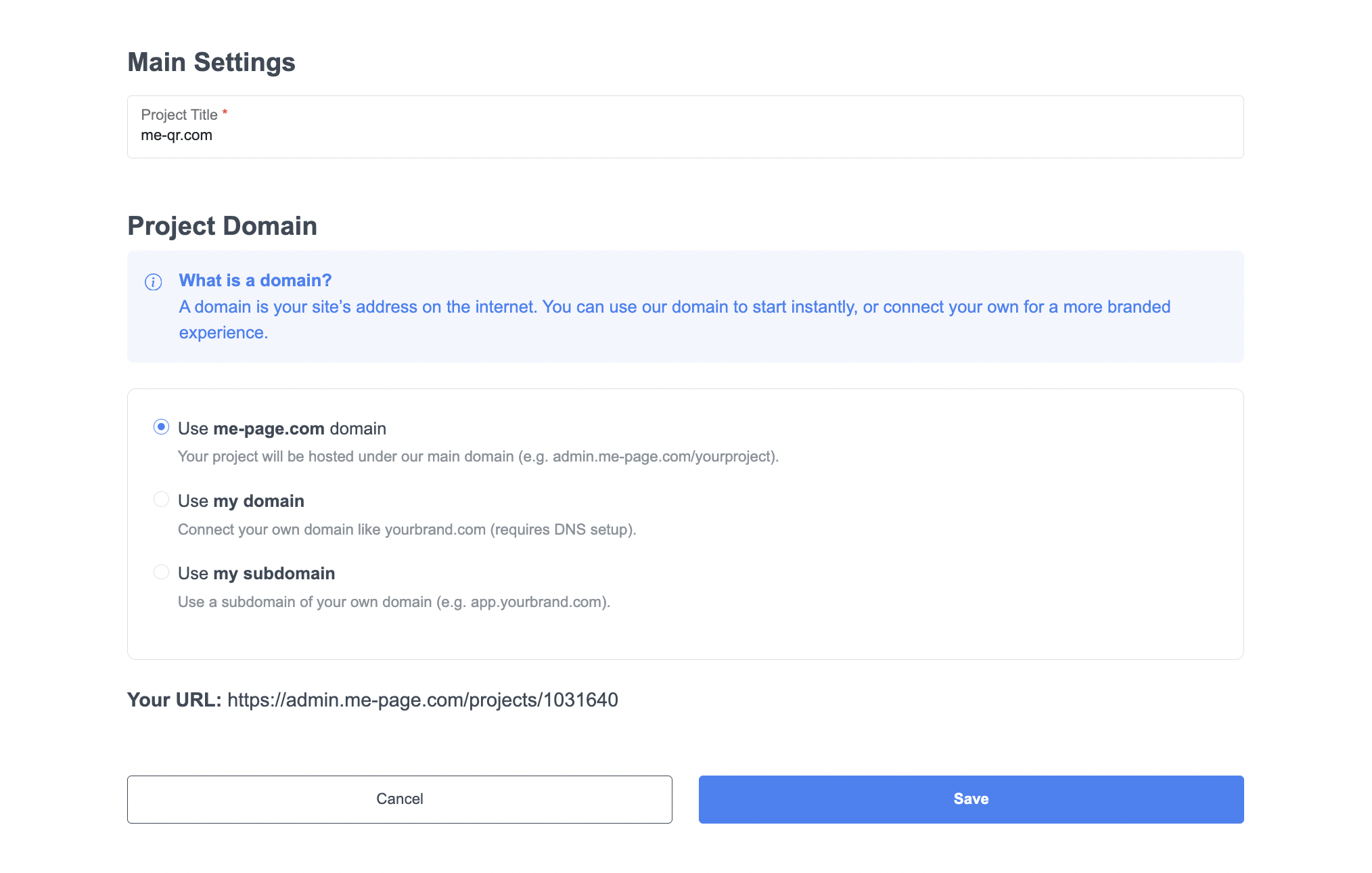
まず、 ME-Pageアカウントにログインし、プロジェクトダッシュボードを開きます。「メイン設定」をクリックすると、設定が始まります。
「プロジェクトタイトル」欄にサイト名(例:me-qr.com)を入力します。次に、「プロジェクトドメイン」までスクロールすると、以下の3つのオプションが表示されます。
- me-page.com ドメインを使用します。迅速な公開に最適です。
- 私のドメインを使用します— 独自の Web アドレスを所有している場合に最適です。
- 私のサブドメインを使用してください。blog.yourbrand.com や shop.yourbrand.com などのセクションを作成するのに最適です。
ステップ2: ドメインオプションを選択する
オプションを選択すると、セットアップのプロセスが案内されます。
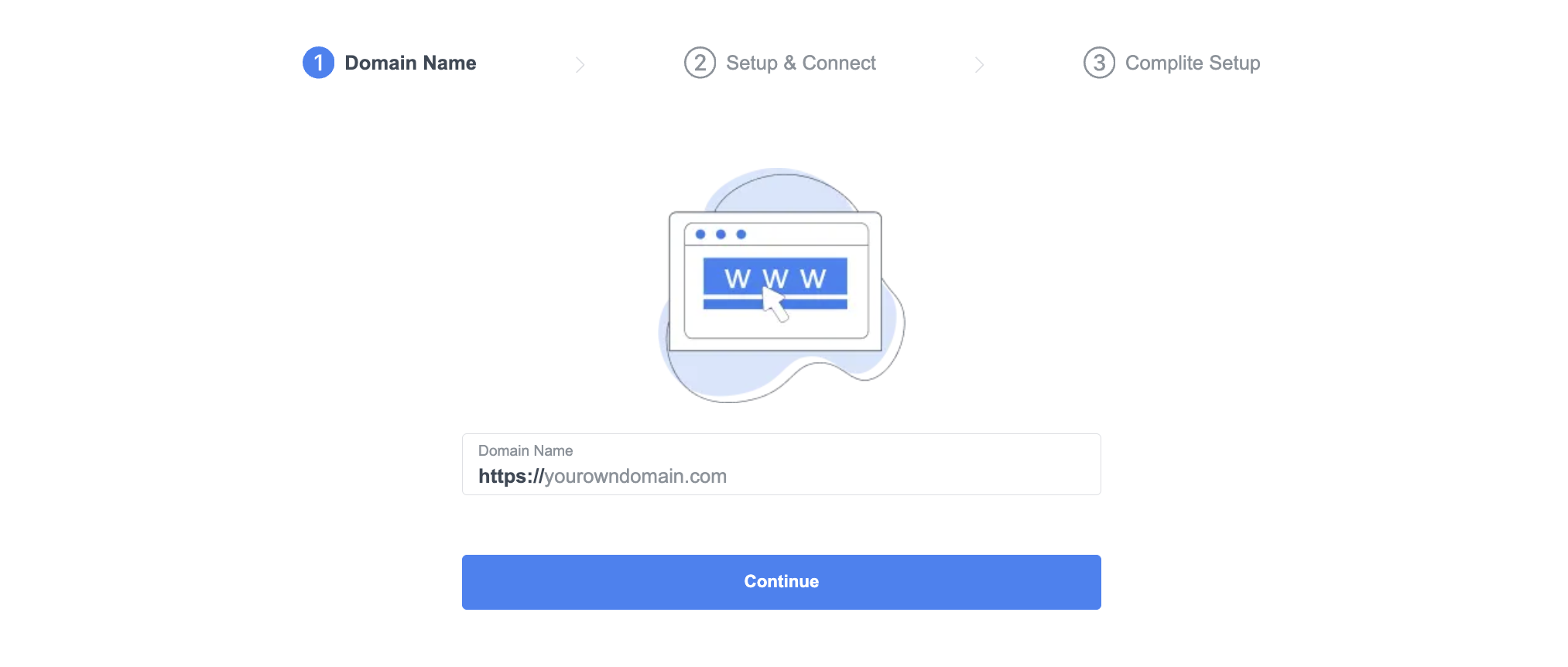
最初のステップでは、ドメイン名を入力します。例:https://yourbrand.com にアクセスし、「続行」をクリックします。
とても簡単です!これにより、カスタム URL を接続する準備ができていることが ME-Page に通知されます。
ステップ3: ドメインを入力して検証する
ME-Pageにドメインの設定画面が表示されます。進捗状況を視覚的に表示するプログレスバーが表示されます。
- ドメイン名
- セットアップと接続
- セットアップを完了する
ドメインを入力したら、次の部分、つまりドメイン プロバイダー (GoDaddy、Namecheap、Google Domains など) を介して接続する部分に進みます。
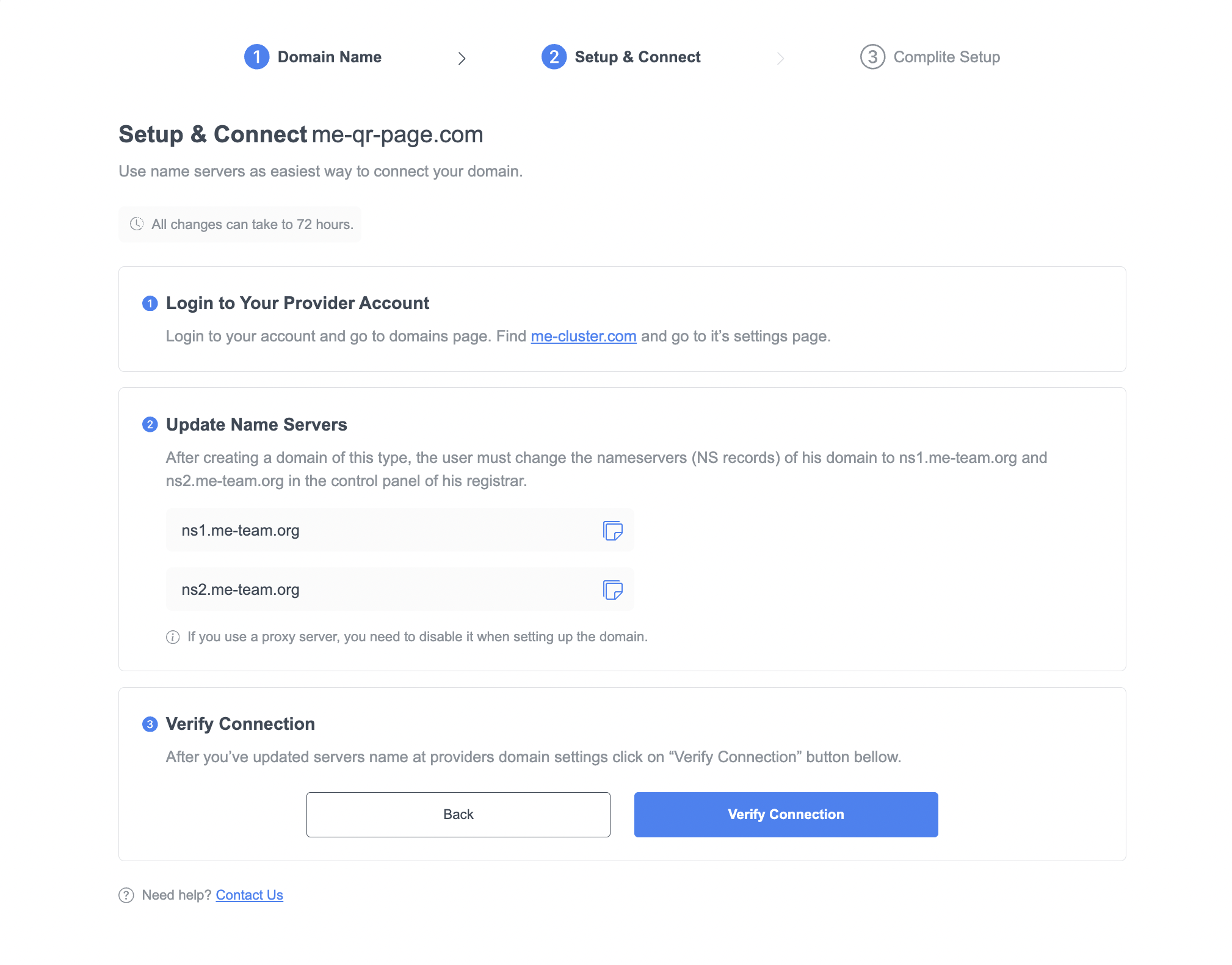
ステップ4: ネームサーバーを更新する
ME-Pageならドメイン統合が超簡単になります。入力が必要なネームサーバーレコードが正確に表示されます。
ns1.me-チーム.org次の手順に従ってください。
- ドメイン レジストラ アカウントにログインします。
- ドメインの DNS またはネーム サーバー設定を開きます。
- 現在のネーム サーバーを上記の 2 つの ME-Page ネーム サーバーに置き換えます。
- 変更を保存します。
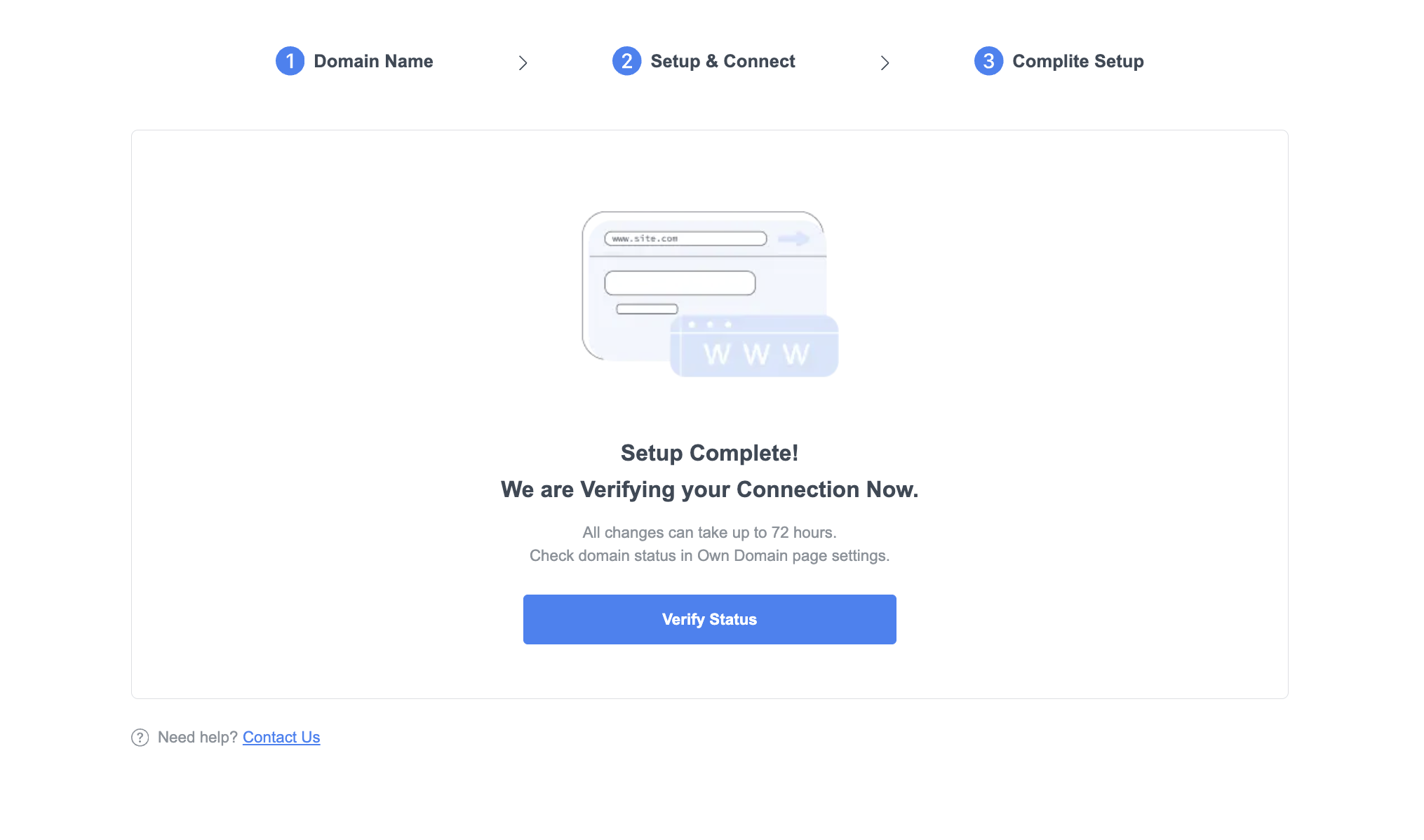
これで完了です!カスタムドメインをME-Pageに接続しました。変更が反映されるまで最大72時間かかる場合がありますが、通常はそれよりも早く反映されます。
ステップ5:ウェブサイトを確認して公開する
ネームサーバーを更新したら、ME ページの設定画面に戻り、「接続の確認」をクリックします。
すべてが正しく設定されていれば、ME-Page が接続を確認します。その後、「保存」をクリックしてサイトを公開します。
これで、あなたのウェブサイトがカスタムURLで表示されます。洗練されたプロフェッショナルなデザインで、訪問者を迎える準備が整っています。ソーシャルメディア、名刺、マーケティング資料などで、安心して共有できます。
ME-PageでカスタムURL設定を使用する利点
カスタムドメインを統合することを選択するのは、見た目だけではありません。パフォーマンス、認識性、そしてスケーラビリティも重要です。さらに、次のようなメリットも享受できます。
- ブランド権威の強化:ドメイン内のビジネス名により、確立された信頼できる企業として認識されます。
- 簡素化されたプロモーション:混乱なく、広告、ソーシャル メディア、QR コードでブランド リンクを使用できます。
- SEO の向上:検索エンジンは独自のドメインを重視し、オーガニックな可視性の向上に役立ちます。
- 長期所有権:無料の URL とは異なり、カスタム ドメインは、サイトを再設計または拡張した場合でも、保持できます。

カスタムドメイン設定に関するよくある質問
まとめ:ウェブサイトを自分らしくする
ME-Pageでカスタムドメインを接続するのは、単にURLをリンクするだけではありません。オンラインでブランドアイデンティティを構築することです。Webアドレスは、メール、広告、口コミなど、あらゆる場所であなたのビジネスを象徴します。
ME-Pageの分かりやすいツールを使えば、ウェブサイトのブランディングドメインを数分で設定できます。プラットフォームのすっきりとしたインターフェースが、URLの入力からネームサーバーの更新、接続の検証まで、すべての手順をガイドします。
フリーランサー、中小企業、クリエイターなど、どんな方でも、一般的なアドレスで満足する必要はありません。オンラインでの存在感をコントロールしましょう。カスタムURLを設定して、あなたのブランドが真にビジネスに根付いていることを世界にアピールしましょう。
今すぐME-Pageにアクセスして、あなたのウェブサイトにふさわしいプロフェッショナルな雰囲気を与えましょう。
この記事は役に立ちましたか?
星をクリックして評価してください!
平均評価: 5/5
投票数: 1
友達と共有:



最新の記事
あなたのウェブサイトにME-Page Constructorを使用するために必要なすべてのこと。

ME-Pageで「テンプレート」と「白紙のページ」のどちらを選ぶべきか
ウェブサイト制作プロジェクトを始める際、重要な決断を迫られます。それは、「既存のテンプレートを使うか」、それとも「白紙の状態からゼロから構築するか」という選択です。 どちらの方法でもプロフェッショナルなウェブサイトを作成...

ME-Pageを活用して、クライアント獲得に向けた写真家向けウェブサイトを構築する方法
あなたの写真は物語を語り、感情を捉え、あなたが世界をどのように見ているかを映し出します。しかし、依頼を検討しているクライアントがあなたの活動について詳しく知ろうとしたとき、作品をじっくりと見て、提供サービスを理解し、あな...

CSSを活用してME-Pageのウェブサイト要素を微調整する方法
ウェブサイトビルダーを使えば、コードを書かなくても簡単にページを作成できますが、標準のデザインオプションだけでは物足りないこともあるでしょう。例えば、余白を調整したり、テキストの見た目を変えたり、背景をカスタマイズしたり...

検索意図を活用してWebサイトのページを計画する方法
SEOにおいてキーワードの選定は重要ですが、ユーザーが検索時に何を求めているのかを把握することも同様に大切です。手短な定義を知りたいユーザーと、製品を比較検討しているユーザー、あるいはサービス提供者への問い合わせを考えて...

Webサイトに効果的な「お客様の声」セクションを設計する方法
初めてウェブサイトを訪れる人は、そこに何があるのか、どのような体験ができるのかをすぐには把握できないものです。サービスや製品、あるいはポートフォリオに興味を持ったとしても、「このビジネスを信頼していいのだろうか?」と...

ME-Pageのウェブサイトにソーシャルメディアのリンクを追加する方法
ウェブサイトは、訪問者があなたについて知り、あなたの作品に触れ、提供しているサービスや商品を発見するための場所です。しかし、あなたのオンラインでの活動は、ウェブサイトだけで完結するわけではないでしょう。Instagram...
ME-Pageで「テンプレート」と「白紙のページ」のどちらを選ぶべきか
ウェブサイト制作プロジェクトを始める際、重要な決断を迫られます。それは、「既存のテンプレートを使うか」、それとも「白紙の状態からゼロから構築するか」という選択です。 どちらの方法でもプロフェッショナルなウェブサイトを作成...
ME-Pageを活用して、クライアント獲得に向けた写真家向けウェブサイトを構築する方法
あなたの写真は物語を語り、感情を捉え、あなたが世界をどのように見ているかを映し出します。しかし、依頼を検討しているクライアントがあなたの活動について詳しく知ろうとしたとき、作品をじっくりと見て、提供サービスを理解し、あな...
CSSを活用してME-Pageのウェブサイト要素を微調整する方法
ウェブサイトビルダーを使えば、コードを書かなくても簡単にページを作成できますが、標準のデザインオプションだけでは物足りないこともあるでしょう。例えば、余白を調整したり、テキストの見た目を変えたり、背景をカスタマイズしたり...
検索意図を活用してWebサイトのページを計画する方法
SEOにおいてキーワードの選定は重要ですが、ユーザーが検索時に何を求めているのかを把握することも同様に大切です。手短な定義を知りたいユーザーと、製品を比較検討しているユーザー、あるいはサービス提供者への問い合わせを考えて...
Webサイトに効果的な「お客様の声」セクションを設計する方法
初めてウェブサイトを訪れる人は、そこに何があるのか、どのような体験ができるのかをすぐには把握できないものです。サービスや製品、あるいはポートフォリオに興味を持ったとしても、「このビジネスを信頼していいのだろうか?」と...
ME-Pageのウェブサイトにソーシャルメディアのリンクを追加する方法
ウェブサイトは、訪問者があなたについて知り、あなたの作品に触れ、提供しているサービスや商品を発見するための場所です。しかし、あなたのオンラインでの活動は、ウェブサイトだけで完結するわけではないでしょう。Instagram...


