Me-Page Team
Last modified 5 Nov 2025
So, you’ve created your website with ME-Page — great start! Your page looks clean, polished, and ready for the world. But here’s the next big question:
How do you know who’s actually visiting your website?
Understanding your website traffic is essential if you want to grow, improve your content, and attract more followers or customers. The good news? You don’t need expensive software or complicated coding. There are several free website tracking tools you can connect to your ME-Page site in just minutes.
In this guide, we’ll walk through how to track website visitors free, monitor analytics, and understand your audience — step by step.
Why Tracking Website Visitors Matters
Your website is your online home — and just like with any home, you want to know who’s stopping by. Tracking website traffic helps you:
- See how many people visit your site
- Understand where visitors come from (Google, Instagram, TikTok, etc.)
- Find out what content or sections get the most clicks
- Measure the success of promotions, ads, or campaigns
- Improve your website to get more engagement
Free Tools You Can Use for ME-Page Analytics
ME-Page makes it simple to monitor website traffic, but you also have the flexibility to integrate external analytics tools. Here are the best free website traffic monitoring options.Option 1: Built-In ME-Page Statistics
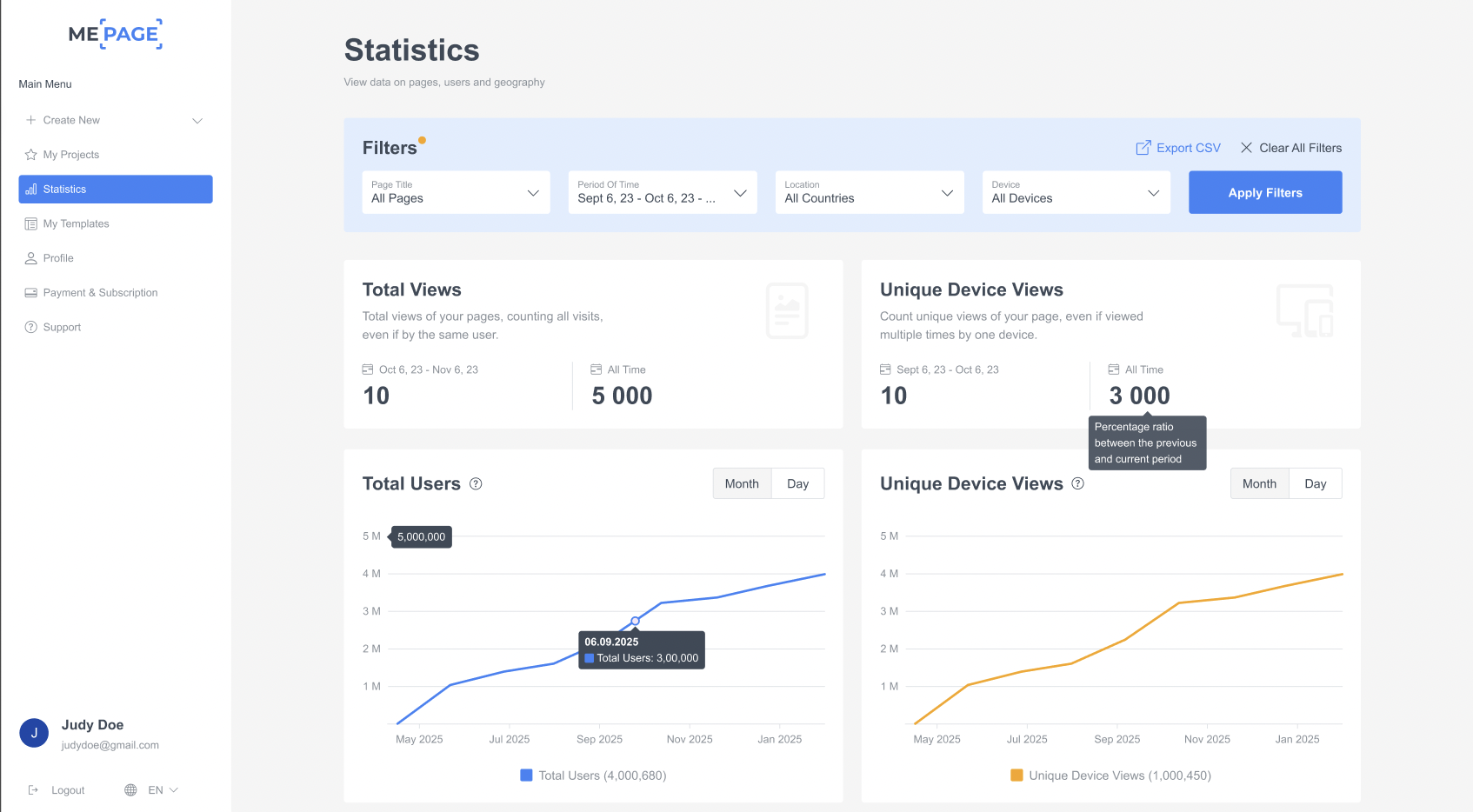
Every project in ME-Page comes with built-in statistics that show essential visitor data — no setup required.
You can instantly view:
- Number of page visitors
- Views over time
- Traffic growth
To access it:
- Go to your Dashboard
- Hover over your page
- Select Statistics
Option 2: Google Analytics (Free & Powerful)
If you want deeper data (user behavior, click paths, session duration, demographics), Google Analytics is the best free choice.
Benefits:
- Completely free
- Highly advanced reporting
- Ideal for business and marketing growth
You’ll simply create a Google Analytics account, generate a tracking code, and add it to your ME-Page project.
Option 3: Plausible Analytics (Simple + Privacy-Focused)
If you prefer simple dashboards and no complex data overwhelm, Plausible Analytics is an excellent lightweight alternative.
Benefits:
- Clean, friendly dashboard
- No cookies, completely privacy-safe
- Easy to read and understand
Step-by-Step: How to Track Visitor Activity in ME-Page (No Code Needed)
One of the best things about ME-Page is that you don’t need to install tracking scripts, embed analytics codes, or configure external tools. Your website visits start tracking automatically as soon as your page is published.
ME-Page includes a built-in analytics dashboard, where you can check your website traffic at any time.
Here’s how to access it:
Step 1: Open Your Project
Log in at ME-Page → Go to your Projects Dashboard.
Locate the website you want to track.
Step 2: Open the Statistics Panel
- In the left-side menu, select Statistics.
- You will now see your website traffic overview.
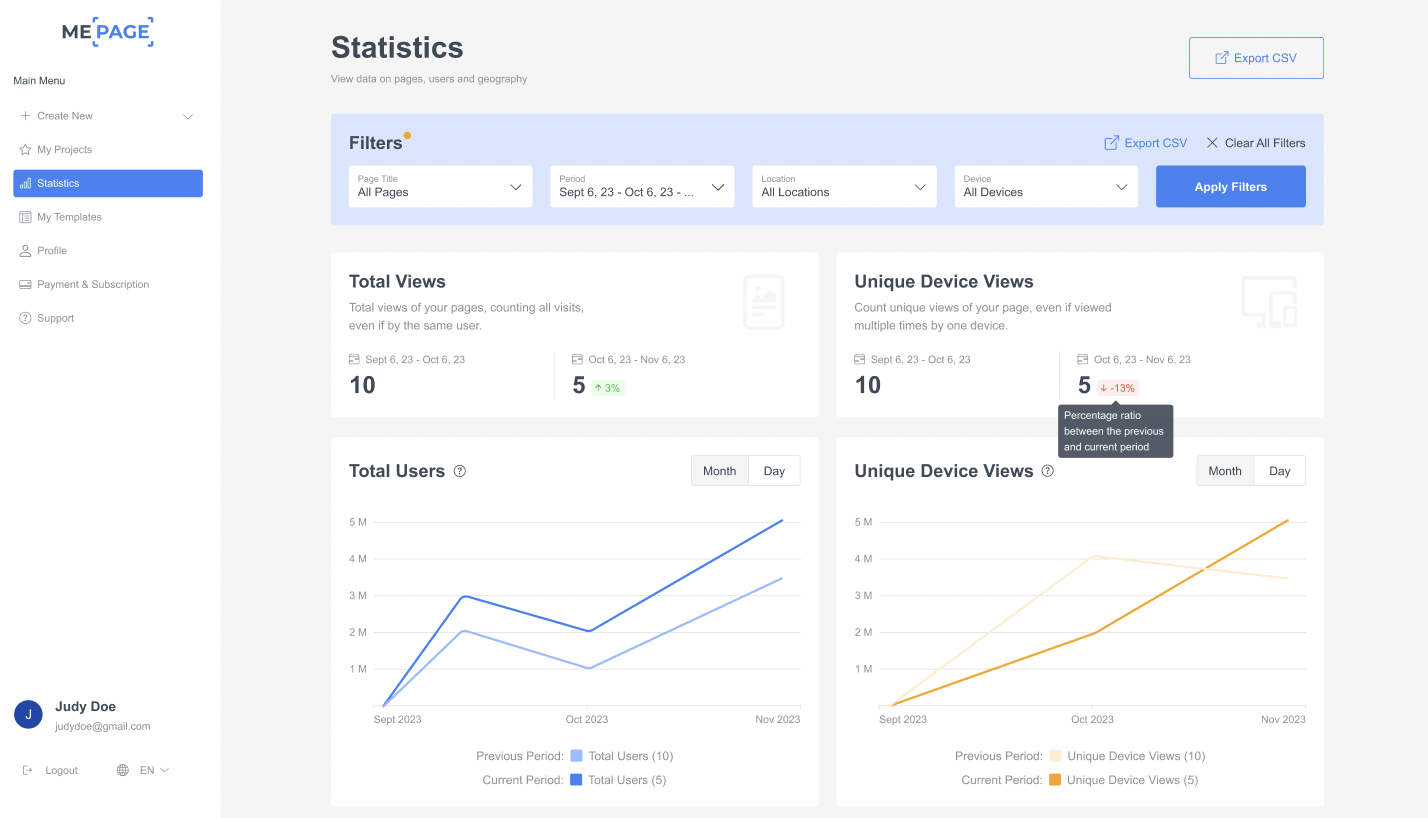
This dashboard shows:
- Total Views — the total number of page views.
- Unique Device Views — how many individual visitors accessed your site.
- Total Users — useful if your visitors return multiple times.
Step 3: Apply Filters to Analyze Your Traffic
At the top of the page, you’ll find Filters (as shown in the images):
- Page Title - Traffic for a specific page or all your pages
- Period of Time - Choose Today, Last 7 Days, Last Month, or Custom Date Range
- Location - See what countries your visitors come from
- Device - See traffic from mobile, PC, or tablet
See traffic from mobile, PC, or tablet.
Step 4: Analyze Visitor Behavior
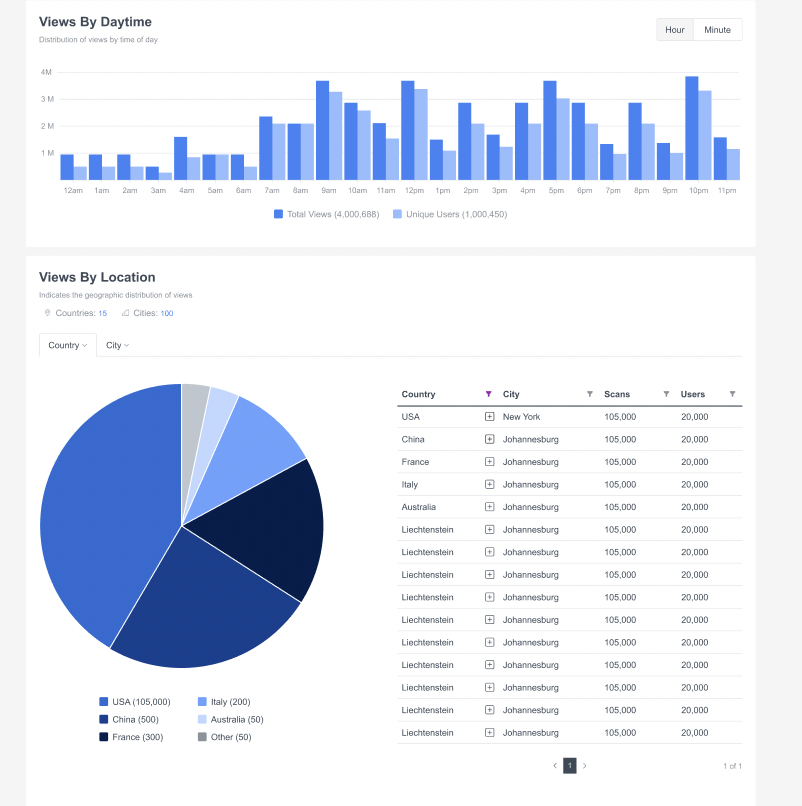
Scroll down to view more detailed charts:
- Views by Daytime - What time of day your audience is most active
- Views by Location - Which geographic regions are your audience hotspots
- World Map Visualization - Audience distribution globally
- Device & Operating System Data - Whether your visitors use iOS, Android, Windows, etc.
Step 5: Export Your Analytics (Optional)
If you need to share your statistics with your team or use them in reports:
- Click Export CSV (located near the Filters bar).
- Download your traffic data in spreadsheet format.
Why This Matters
By regularly checking your ME-Page analytics, you can:
- Evaluate which pages perform the best
- Adjust content to match audience interest
- Know the best times to post or share your link
- Optimize your site for the devices your visitors use most
No external tools, no setup, no technical work — everything is automatic.

Conclusion
Tracking your website visitors doesn’t have to be complicated. With ME-Page analytics, plus free tools such as Google Analytics and Plausible, you can easily monitor who’s visiting your site, where they come from, and what interests them most.
This information is valuable — whether you’re a small business, freelancer, creator, or community project. It helps you make your site more engaging, professional, and effective.
So go ahead — connect your tracking tools and start understanding your audience today.
Your ME-Page website has potential — and now, you’ll have the data to unlock it.
Was This Article Helpful?
Click on a star to rate it!
Average Rating: 4/5
Voutes: 1
Share with Friends:



Previous
Using a Custom Domain: Connect Your Website to Your Brand

Next
Unlock Advanced Customization with HTML and CSS in ME-Page
Recent Articles
Everything You Need to Know About Using ME-Page Constructor for Your Website.

How to Link Pages Together for Better Website Navigation
A multi-page website gives you more room to organize information, but adding pages is only half the job. Visit...

Build a Personal Website That Stands Out in 2026
Your social media profiles can show what you do, but they do not give you complete control over your online pr...

Managing Multiple Websites from One ME-Page Account
Running more than one website used to be complicated. Different logins, scattered tools, and endless switching...
How to Organize Content Across Multiple Website Pages
A multi-page website gives you room to explain your business, services, products, and ideas without putting ev...

Essential Pages Every Business Website Should Include
A business website doesn't need dozens of pages to look professional. What it does need is a clear structure t...

How to Write Website Headlines That Attract More Visitors
A headline is often the first piece of text people notice when they open a website. Before they read your para...
How to Link Pages Together for Better Website Navigation
A multi-page website gives you more room to organize information, but adding pages is only half the job. Visit...
Build a Personal Website That Stands Out in 2026
Your social media profiles can show what you do, but they do not give you complete control over your online pr...
Managing Multiple Websites from One ME-Page Account
Running more than one website used to be complicated. Different logins, scattered tools, and endless switching...
How to Organize Content Across Multiple Website Pages
A multi-page website gives you room to explain your business, services, products, and ideas without putting ev...
Essential Pages Every Business Website Should Include
A business website doesn't need dozens of pages to look professional. What it does need is a clear structure t...
How to Write Website Headlines That Attract More Visitors
A headline is often the first piece of text people notice when they open a website. Before they read your para...










