Me-Page Team
Last modified 20 Jan 2026
Article Plan
- What Are Subpages in ME-Page?
- How to Add a Subpage in ME-Page
- Managing Pages Inside the ME-Page Editor
- Linking Subpages for Seamless Navigation
- Benefits of Using Subpages in ME-Page
- Best Practices for Subpage Organization
- Why Subpages Matter for SEO and Conversions
- Conclusion
- Frequently Asked Questions about Subpages in ME-Page
Creating a clear website structure is essential for usability, SEO, and conversions. With ME-Page, adding and managing subpages is designed to be visual, fast, and beginner-friendly, no coding required. Whether you’re building a business website, portfolio, blog, or multi-page landing experience, ME-Page gives you full control over how your pages are created, organized, and connected.
This guide explains how subpages work in ME-Page, how to manage them efficiently, and how proper page linking improves navigation and performance.

What Are Subpages in ME-Page?
Subpages in ME-Page are additional pages connected to your main website, such as About, Services, Portfolio, Blog, FAQ, or Contact. Each subpage can have its own unique URL, content blocks, and purpose, while still staying visually consistent with your main page.
From the interface shown in ME-Page, subpages are managed directly from the page selector menu at the top of the editor. This allows you to switch between pages instantly without leaving the builder.How to Add a Subpage in ME-Page
Adding a subpage in ME-Page is a simple, guided process:
- Open your project and click the Page dropdown (usually labeled “Home Page”).
- Select + Create Subpage from the menu.
- In the “Create Subpage” window:
- Enter a Subpage Name (for example, “Services” or “Blog”).
- Set the Page URL, which is automatically generated but editable.
- Choose whether to keep the same layout, colors, and styles as your homepage.
- Click Create Page.
Once created, the new subpage immediately appears in your page list and is ready for editing.


Managing Pages Inside the ME-Page Editor
ME-Page makes page management intuitive through a centralized sidebar and page menu. From there, you can:
- Switch between pages instantly
- Duplicate pages to reuse layouts
- Delete pages you no longer need
- Apply consistent branding across all pages
- Edit each page independently with blocks and sections
Because all pages are managed within one workspace, there’s no confusion about structure or hierarchy. This is especially helpful for growing websites that add content over time.
Linking Subpages for Seamless Navigation
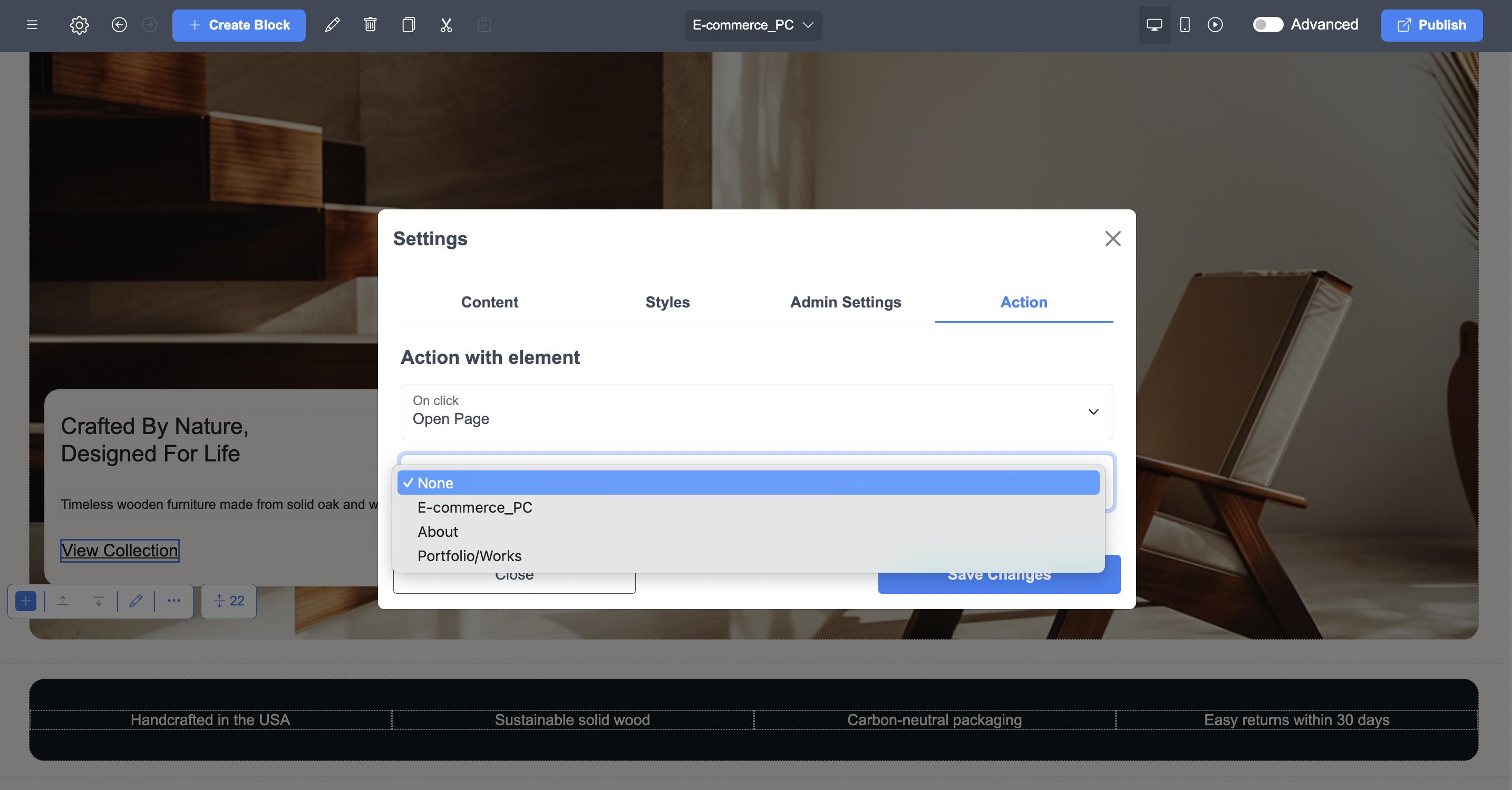
Navigation plays a major role in user experience. ME-Page automatically includes newly created subpages in your site’s internal structure, making them easy to link.
You can link subpages by:
- Adding them to navigation menus
- Connecting buttons or text links to specific pages
- Creating call-to-action sections that guide visitors across your site
This internal linking helps visitors explore your content naturally and improves how search engines understand your site structure.
Benefits of Using Subpages in ME-Page
Best Practices for Subpage Organization
To get the most out of ME-Page subpages:
- Use clear, descriptive page names
- Keep URLs short and readable
- Group related content into dedicated pages
- Avoid overcrowding a single page with too much information
- Link subpages strategically using buttons and menus
This approach improves usability and makes your website feel professional and well-structured.
Why Subpages Matter for SEO and Conversions
Search engines favor websites with logical structure and clear topic separation. Subpages allow ME-Page users to target multiple keywords, improve indexing, and keep content focused.
From a conversion standpoint, subpages guide visitors step by step, from learning about your brand to taking action, without overwhelming them on a single page.

Conclusion
Using subpages effectively is one of the simplest ways to turn a basic website into a structured, professional online presence. With ME-Page, adding, managing, and linking subpages doesn’t require technical knowledge or complex setup. The visual editor, clear page menu, and guided subpage creation process make it easy to organize content logically and scale your website over time.
Well-structured subpages improve more than just navigation. They help visitors find information faster, keep users engaged longer, and create clear paths toward conversions, whether that’s contacting you, booking a service, or exploring your work. From an SEO perspective, dedicated subpages with unique URLs give search engines better context, increasing your chances of ranking for multiple topics instead of competing with yourself on a single page.
As your website grows, ME-Page’s flexible subpage system ensures you can expand without redesigning everything from scratch. By planning your page structure early and linking pages thoughtfully, you create a smoother experience for both users and search engines, laying a strong foundation for long-term visibility, credibility, and growth.
Frequently Asked Questions about Subpages in ME-Page
Yes, ME-Page allows you to edit the page URL, making it easy to optimize for SEO or update your site structure later.
ME-Page supports scalable website structures, so you can add multiple subpages as your content and business grow.
Yes. Each subpage has its own URL, making it indexable and SEO-friendly when properly optimized.
Yes. ME-Page subpages are flexible and can support blogs, portfolios, services, galleries, or info pages. Each subpage can be customized with its own layout, content, and media for clear, professional presentation.
Was This Article Helpful?
Click on a star to rate it!
Average Rating: 4.8/5
Voutes: 4
Share with Friends:



Previous
How Multi-Page Websites Help Businesses Convert More Visitors
Next
Simple Pages, Real Results: Build a Clean One-Page Website with ME-Page
Recent Articles
Everything You Need to Know About Using ME-Page Constructor for Your Website.

Using Multi-Page Navigation to Improve User Experience
As your website grows, visitors need an easy way to move between pages without getting lost. Whether you're bu...

How Internal Links Improve SEO on Multi-Page Websites
When people think about SEO, they often focus on keywords, backlinks, or content creation. While those factors...
How to Choose the Best Homepage Layout for Your Goals
Your homepage is often the first impression visitors have of your brand. Within just a few seconds, people dec...

How to Plan Your Website Before You Start Building
Building a website can feel exciting. You may already be thinking about colors, images, fonts, and clever head...
Using Subpages to Build Service, Pricing, and About Pages
As your website grows, placing all your information on a single page becomes less effective. Visitors want to ...

Why Every Artist Needs a Website Beyond Social Media
For artists, musicians, photographers, illustrators, and other creatives, social media has become an important...
Using Multi-Page Navigation to Improve User Experience
As your website grows, visitors need an easy way to move between pages without getting lost. Whether you're bu...
How Internal Links Improve SEO on Multi-Page Websites
When people think about SEO, they often focus on keywords, backlinks, or content creation. While those factors...
How to Choose the Best Homepage Layout for Your Goals
Your homepage is often the first impression visitors have of your brand. Within just a few seconds, people dec...
How to Plan Your Website Before You Start Building
Building a website can feel exciting. You may already be thinking about colors, images, fonts, and clever head...
Using Subpages to Build Service, Pricing, and About Pages
As your website grows, placing all your information on a single page becomes less effective. Visitors want to ...
Why Every Artist Needs a Website Beyond Social Media
For artists, musicians, photographers, illustrators, and other creatives, social media has become an important...










