Me-Page Team
最后修改 3 Nov 2025
文章计划
- 为什么自定义域名对您的品牌至关重要
- 分步域集成指南
- 使用 ME-Page 的自定义 URL 设置的优势
- 关于自定义域名设置的常见问题
- #blockContent1762268966740-10 .custom-1762268996885-0 { text-align: start } #blockContent1762268966740-10 .custom-1762268996885-1 { font-size: 24px; font-family: Arial } #blockContent1762268966740-10 .custom-1762268996885-2 { font-size: 24px; font-family: Arial; color: rgb(52, 73, 94) } #blockContent1762268966740-10 .custom-1762268996885-3 { color: rgb(0, 0, 0); background: rgba(0, 0, 0, 0) none repeat scroll 0% 0% / auto padding-box border-box; background-color: rgba(0, 0, 0, 0); font-family: -apple-system, 'system-ui', 'Segoe UI', Roboto, Oxygen, Ubuntu, Cantarell, 'Open Sans', 'Helvetica Neue', sans-serif; font-size: 16px; font-weight: bold; font-style: normal; line-height: 22.4px; -webkit-background-clip: border-box } 我的域名需要多久才能连接成功?
- #blockContent1762269051017-16 .custom-1762268996885-0 { text-align: start } #blockContent1762269051017-16 .custom-1762268996885-1 { font-size: 24px; font-family: Arial } #blockContent1762269051017-16 .custom-1762268996885-2 { font-size: 24px; font-family: Arial; color: rgb(52, 73, 94) } #blockContent1762269051017-16 .custom-1762268996885-3 { color: rgb(0, 0, 0); background: rgba(0, 0, 0, 0) none repeat scroll 0% 0% / auto padding-box border-box; background-color: rgba(0, 0, 0, 0); font-family: -apple-system, 'system-ui', 'Segoe UI', Roboto, Oxygen, Ubuntu, Cantarell, 'Open Sans', 'Helvetica Neue', sans-serif; font-size: 16px; font-weight: bold; font-style: normal; line-height: 22.4px; -webkit-background-clip: border-box } #blockContent1762269051017-16 .custom-1762269071221-0 { color: rgb(52, 73, 94); font-family: Arial; font-size: 24px; font-weight: bold; line-height: 33.6px; background: none 0% 0% / auto repeat scroll padding-box border-box rgba(0, 0, 0, 0) } #blockContent1762269051017-16 .custom-1762269071221-1 { color: rgb(52, 73, 94); font-family: Arial; font-size: 24px; font-weight: bold; line-height: 33.6px; background: none 0% 0% / auto repeat scroll padding-box border-box rgba(0, 0, 0, 0) } #blockContent1762269051017-16 .custom-1762269071221-2 { color: rgb(52, 73, 94); font-family: Arial; font-size: 24px; font-weight: bold; line-height: 33.6px; background: none 0% 0% / auto repeat scroll padding-box border-box rgba(0, 0, 0, 0) } #blockContent1762269051017-16 .custom-1762269071221-3 { color: rgb(52, 73, 94); font-family: Arial; font-size: 24px; font-weight: bold; line-height: 33.6px; background: none 0% 0% / auto repeat scroll padding-box border-box rgba(0, 0, 0, 0) } #blockContent1762269051017-16 .custom-1762269071221-4 { color: rgb(52, 73, 94); font-family: Arial; font-size: 24px; font-weight: bold; line-height: 33.6px; background: none 0% 0% / auto repeat scroll padding-box border-box rgba(0, 0, 0, 0) } 如果我的验证失败怎么办?
- #blockContent1762269053498-22 .custom-1762268996885-0 { text-align: start } #blockContent1762269053498-22 .custom-1762268996885-1 { font-size: 24px; font-family: Arial } #blockContent1762269053498-22 .custom-1762268996885-2 { font-size: 24px; font-family: Arial; color: rgb(52, 73, 94) } #blockContent1762269053498-22 .custom-1762269144974-0 { color: rgb(52, 73, 94); font-family: Arial; font-size: 24px; font-weight: bold; line-height: 33.6px; background: none 0% 0% / auto repeat scroll padding-box border-box rgba(0, 0, 0, 0) } #blockContent1762269053498-22 .custom-1762269144974-1 { color: rgb(52, 73, 94); font-family: Arial; font-size: 24px; font-weight: bold; line-height: 33.6px; background: none 0% 0% / auto repeat scroll padding-box border-box rgba(0, 0, 0, 0) } #blockContent1762269053498-22 .custom-1762269144974-2 { color: rgb(52, 73, 94); font-family: Arial; font-size: 24px; font-weight: bold; line-height: 33.6px; background: none 0% 0% / auto repeat scroll padding-box border-box rgba(0, 0, 0, 0) } #blockContent1762269053498-22 .custom-1762269144974-3 { color: rgb(52, 73, 94); font-family: Arial; font-size: 24px; font-weight: bold; line-height: 33.6px; background: none 0% 0% / auto repeat scroll padding-box border-box rgba(0, 0, 0, 0) } #blockContent1762269053498-22 .custom-1762269144974-4 { color: rgb(52, 73, 94); font-family: Arial; font-size: 24px; font-weight: bold; line-height: 33.6px; background: none 0% 0% / auto repeat scroll padding-box border-box rgba(0, 0, 0, 0) } 我需要具备技术知识吗?
- #blockContent1762269182414-28 .custom-1762268996885-0 { text-align: start } #blockContent1762269182414-28 .custom-1762268996885-1 { font-size: 24px; font-family: Arial } #blockContent1762269182414-28 .custom-1762269204368-0 { color: rgb(52, 73, 94); font-family: Arial; font-size: 24px; font-weight: bold; line-height: 33.6px; background: none 0% 0% / auto repeat scroll padding-box border-box rgba(0, 0, 0, 0) } #blockContent1762269182414-28 .custom-1762269204368-1 { color: rgb(52, 73, 94); font-family: Arial; font-size: 24px; font-weight: bold; line-height: 33.6px; background: none 0% 0% / auto repeat scroll padding-box border-box rgba(0, 0, 0, 0) } #blockContent1762269182414-28 .custom-1762269204368-2 { color: rgb(52, 73, 94); font-family: Arial; font-size: 24px; font-weight: bold; line-height: 33.6px; background: none 0% 0% / auto repeat scroll padding-box border-box rgba(0, 0, 0, 0) } #blockContent1762269182414-28 .custom-1762269204368-3 { color: rgb(52, 73, 94); font-family: Arial; font-size: 24px; font-weight: bold; line-height: 33.6px; background: none 0% 0% / auto repeat scroll padding-box border-box rgba(0, 0, 0, 0) } #blockContent1762269182414-28 .custom-1762269204368-4 { color: rgb(52, 73, 94); font-family: Arial; font-size: 24px; font-weight: bold; line-height: 33.6px; background: none 0% 0% / auto repeat scroll padding-box border-box rgba(0, 0, 0, 0) } 我之后可以切换回 ME-Page 域名吗?
- #blockContent1762269184606-34 .custom-1762268996885-0 { text-align: start } #blockContent1762269184606-34 .custom-1762268996885-1 { font-size: 24px; font-family: Arial } #blockContent1762269184606-34 .custom-1762269252286-0 { font-family: Arial; font-size: 24px } #blockContent1762269184606-34 .custom-1762269252286-1 { color: rgb(52, 73, 94) } #blockContent1762269184606-34 .custom-1762269252286-2 { color: #34495e } 域名和子域名有什么区别?
- #blockContent1762269186270-40 .custom-1762269316498-0 { font-size: 24px; font-family: Arial } #blockContent1762269186270-40 .custom-1762269316498-1 { color: #34495e } 如果我已经有一个子域名了怎么办?
- 最后总结:打造真正属于你自己的网站
想让您的网站看起来更专业,建立更牢固的品牌信任度吗?那么,在 ME-Page 中绑定一个自定义域名是最佳选择。与其使用像 yourname.me-page.com这样的通用地址,不如想象一下,将访客引导至www.yourbrand.com——简洁、可信,并且完全属于您。
在ME-Page,您只需点击几下即可轻松连接您的网站品牌域名。无需处理复杂的代码或进行高级设置——一切都已为您简化。
为什么自定义域名对您的品牌至关重要
自定义网址设置不仅仅是外观上的升级——它关乎你的在线身份。把你的网站地址想象成你的数字店面招牌。你会信任一个网址混乱、莫名其妙的店铺吗?恐怕不会。
通过将您的自定义域名连接到您的 ME-Page 网站,您可以:
- 提升专业度:访客会立即将您的品牌视为合法且知名的品牌。
- 提升搜索引擎排名:搜索引擎偏爱品牌域名,这有助于提高网站排名。
- 建立信任:客户更有可能与体现您品牌名称的网站互动。
- 增强分享性:简短、个性化的网址更容易记住和分享。
使用 ME-Page,连接您自己的域名就像给项目命名并点击“保存”一样简单。
分步域集成指南
您无需成为技术专家即可连接您的自定义域名。只需按照这份简单的域名集成指南操作,您的品牌网站即可立即上线。步骤 1:访问您的项目设置
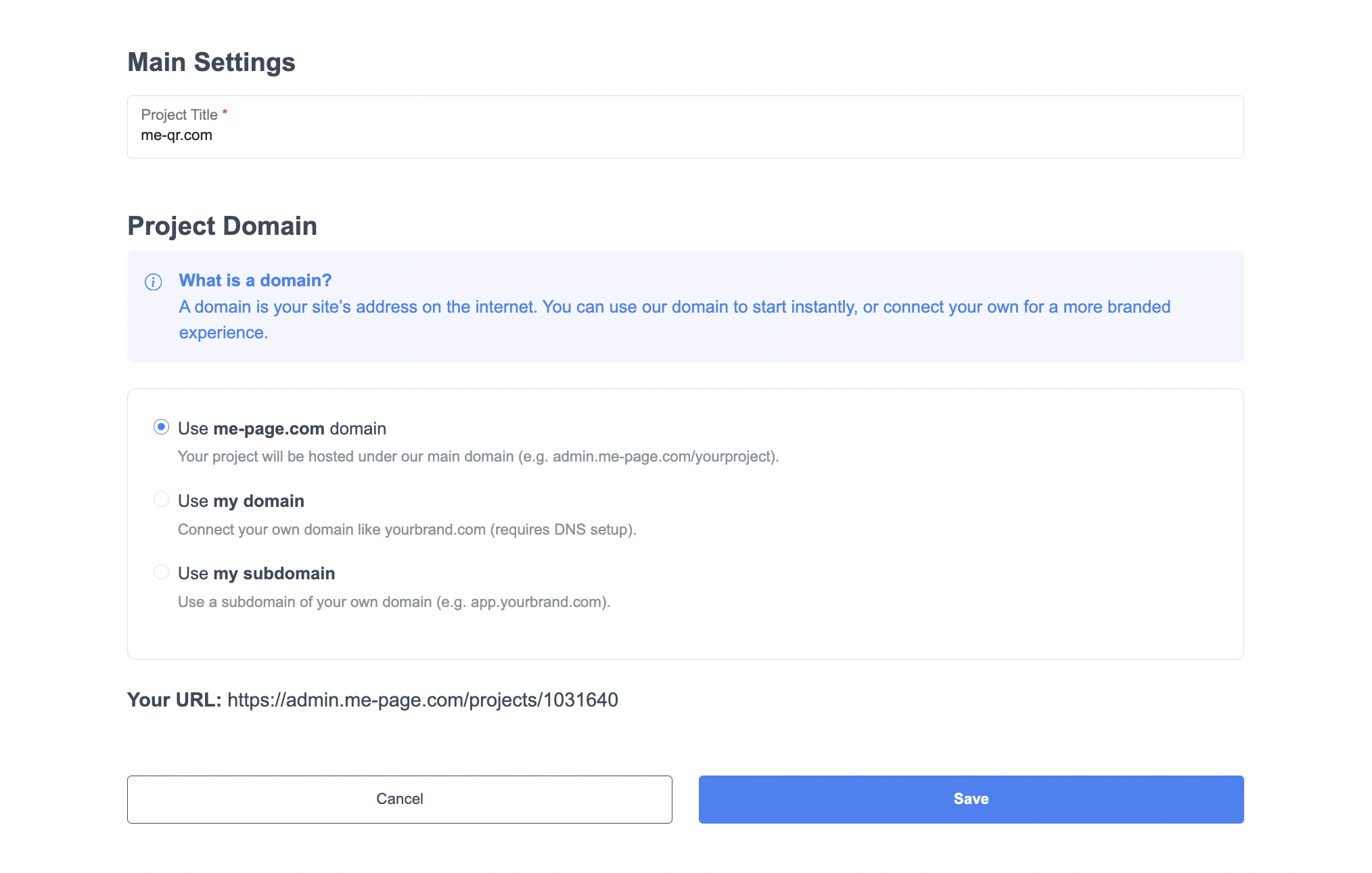
首先,登录您的ME-Page帐户并打开您的项目仪表板。点击“主要设置”——设置过程从这里开始。
在“项目标题”字段中,输入您的网站名称(例如,me-qr.com)。然后向下滚动到“项目域名”,您将看到三个选项:
- 使用 me-page.com 域名——非常适合快速发布内容。
- 使用我的域名——如果您拥有自己的网址,这将是理想之选。
- 使用我的子域名——非常适合创建类似 blog.yourbrand.com 或 shop.yourbrand.com 这样的版块。
步骤 2:选择您的域名选项
选择选项后,您将按照提示完成设置过程。
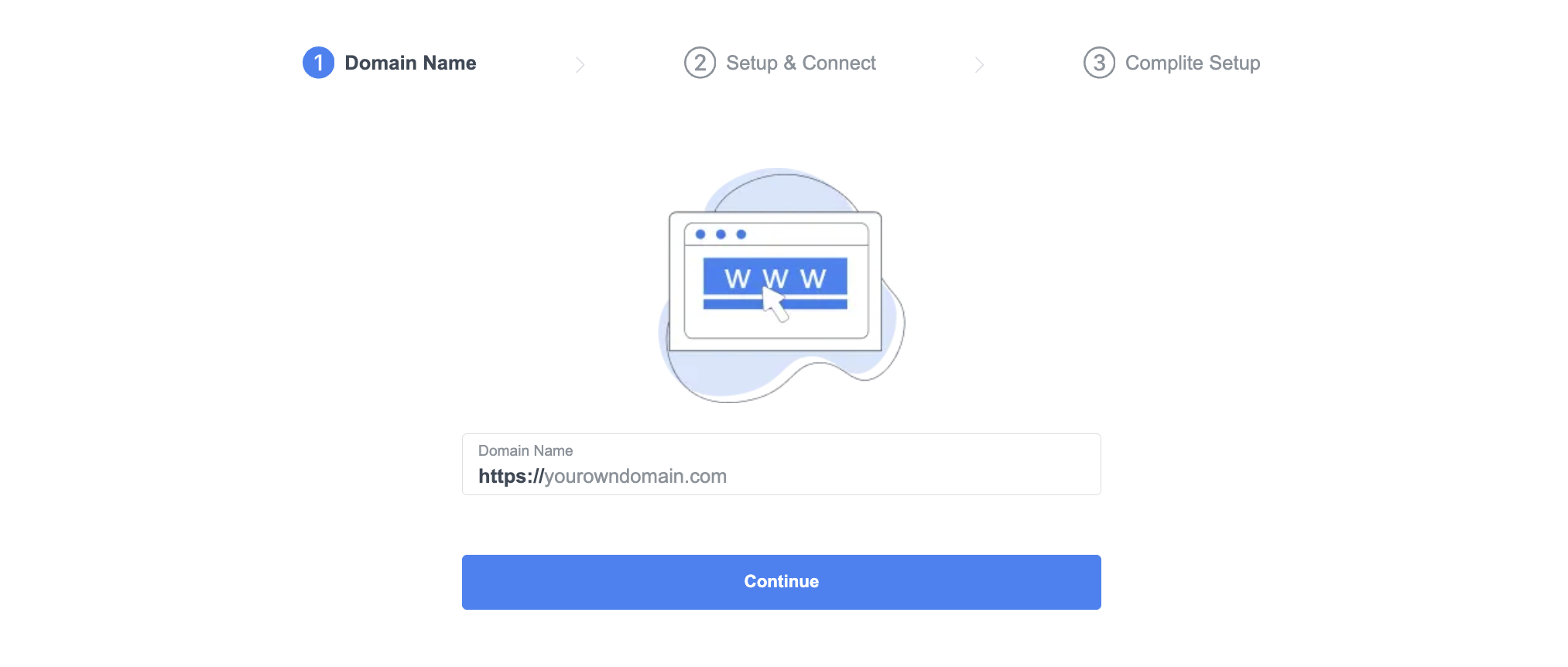
第一步,输入您的域名——例如,访问 https://yourbrand.com — 然后点击“继续”。
就这么简单!这样就告诉 ME-Page 您已准备好连接自定义 URL。
步骤 3:输入并验证您的域名
现在,ME-Page 将显示您的域名在设置页面。您会看到一个可视化的进度条,引导您完成设置:
- 域名
- 设置和连接
- 完整设置
输入您的域名后,您将进入下一部分:通过您的域名提供商(如 GoDaddy、Namecheap 或 Google Domains)将其连接。
第四步:更新域名服务器
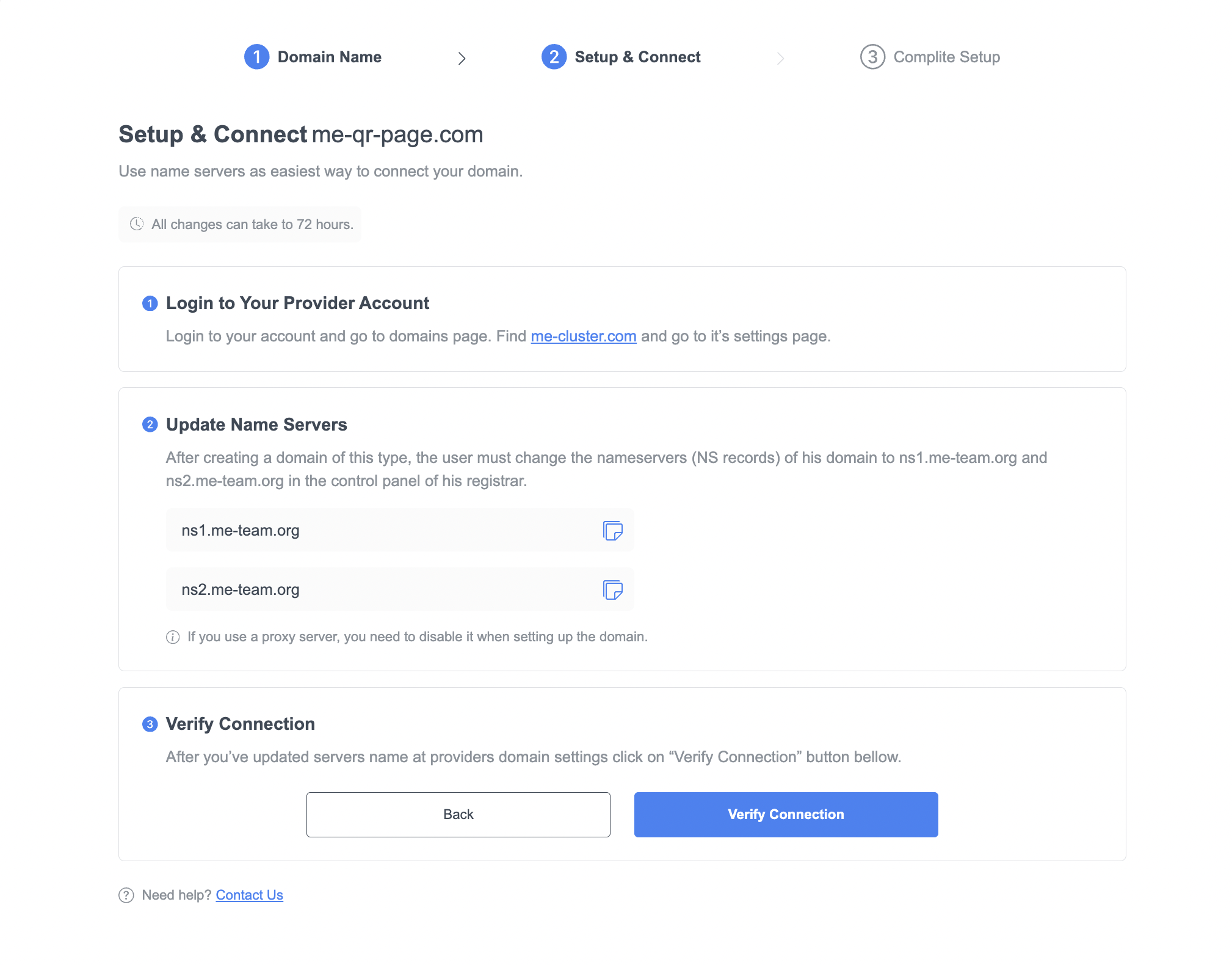
ME-Page 让域名集成变得极其简单。您将看到需要输入的确切名称服务器记录:
ns1.me-team.org请按照以下步骤操作:
- 登录您的域名注册商账户。
- 打开您域名的 DNS 或名称服务器设置。
- 将当前名称服务器替换为上面提到的两个 ME-Page 名称服务器。
- 保存更改。
搞定!您已将自定义域名连接到 ME-Page。更改可能需要长达 72 小时才能生效,但通常会更快。
第五步:验证并发布您的网站
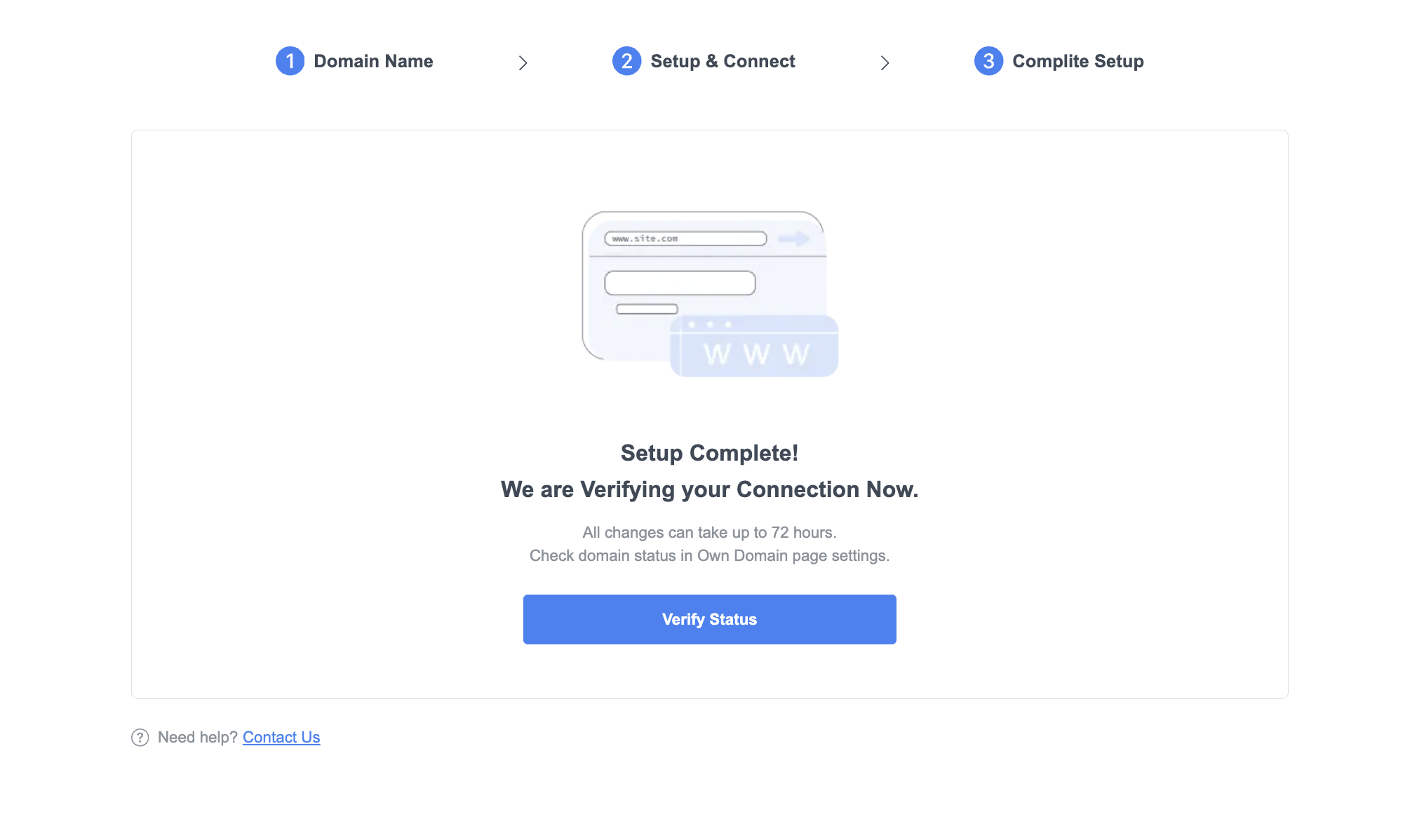
更新名称服务器后,返回 ME-Page 设置屏幕,然后单击“验证连接”。
如果一切配置正确,ME-Page 会确认您的连接。然后,点击“保存”并发布您的网站。
现在,您的网站将出现在您自定义的网址上——简洁、专业,随时恭候访客。您可以自信地在社交媒体、名片和营销材料上分享它。
使用 ME-Page 的自定义 URL 设置的优势
选择集成自定义域名不仅仅关乎外观,更关乎性能、识别度和可扩展性。以下是您将享受到的其他一些优势:
- 提升品牌权威性:您的公司名称在域名中会让您看起来更成熟可靠。
- 简化推广:在广告、社交媒体和二维码中使用您的品牌链接,避免混淆。
- SEO提升:搜索引擎重视原创域名,这有助于提高自然搜索排名。
- 长期所有权:与免费网址不同,您的自定义域名将一直属于您——即使您重新设计或扩展您的网站。

关于自定义域名设置的常见问题
最后总结:打造真正属于你自己的网站
在 ME-Page 中连接自定义域名不仅仅是链接一个网址——它关乎在线品牌形象的构建。您的网址代表着您的业务,出现在电子邮件、广告,甚至口碑传播的每一个角落。
借助 ME-Page 简单易用的工具,您可以在几分钟内设置网站品牌域名。该平台简洁的界面会引导您完成每一步操作——从输入网址到更新域名服务器,再到验证连接。
所以,无论你是自由职业者、小型企业还是内容创作者,都不要使用通用网址。掌控你的线上形象。关联你的自定义网址,向世界展示你的品牌实力。
立即前往ME-Page,让您的网站拥有应有的专业水准。
这篇文章对你有帮助吗?
点击星星进行评分!
平均评分: 5/5
投票数: 1
与朋友分享:


上一页
How to Duplicate and Reuse Pages in ME-Page

下一页
How to Track Visitor Traffic on Your ME-Page Website Using Free Tools
最新文章
关于使用ME-Page Constructor构建网站的所有须知。

利用多页面导航提升用户体验
随着网站的发展,访客需要一种便捷的方式在页面间轻松切换,避免迷失方向。无论您是构建企业网站、作品集、在线商店还是社区平台,高效的多页面导航都至关重要,它能帮助用户快速找到所需信息并完成重要操作。 良好的网站导航不仅仅是...

如何利用内部链接提升多页面网站的 SEO
人们想到SEO时,往往会关注关键词、反向链接或内容创作。虽然这些因素很重要,但最简单有效的优化技巧之一却常常被忽视:内部链接。 网站上每个连接不同页面的链接都能帮助访客发现更多内容,同时也能帮助搜索引擎更好地理解您的网...
如何选择最适合您目标的首页布局
首页通常是访客对您品牌的第一印象。短短几秒钟内,人们就会决定是继续浏览您的网站还是离开。因此,选择合适的首页布局是网站创建过程中最重要的决策之一。 精心设计的网站首页不仅仅美观——它还能引导访客、传递您的价值并鼓励他们...

如何在建站前做好网站规划
搭建网站令人兴奋。您可能已经在考虑颜色、图片、字体和巧妙的标题了。但直接投入设计往往会在后期造成不必要的麻烦。 良好的网站规划能在您开始移动按钮和创建页面之前,为您的项目指明方向。它能帮助您了解受众、组织内容,并确定网...
使用子页面构建服务、价格和关于我们页面
随着网站规模的扩大,将所有信息放在单个页面上的效率会降低。访客希望快速找到特定信息,无论是服务、价格还是公司背景。将内容组织到独立的子页面中,可以打造更清晰的用户体验,并帮助用户更轻松地浏览您的网站。 结构良好的服务页...

为什么每位艺术家都需要一个网站,而不仅仅是社交媒体?
对于艺术家、音乐家、摄影师、插画家和其他创意人士来说,社交媒体已成为分享作品和与受众建立联系的重要途径。虽然像 Instagram、TikTok 和 Facebook 这样的平台可以帮助提升知名度,但它们不应该是你作品的...
利用多页面导航提升用户体验
随着网站的发展,访客需要一种便捷的方式在页面间轻松切换,避免迷失方向。无论您是构建企业网站、作品集、在线商店还是社区平台,高效的多页面导航都至关重要,它能帮助用户快速找到所需信息并完成重要操作。 良好的网站导航不仅仅是...
如何利用内部链接提升多页面网站的 SEO
人们想到SEO时,往往会关注关键词、反向链接或内容创作。虽然这些因素很重要,但最简单有效的优化技巧之一却常常被忽视:内部链接。 网站上每个连接不同页面的链接都能帮助访客发现更多内容,同时也能帮助搜索引擎更好地理解您的网...
如何选择最适合您目标的首页布局
首页通常是访客对您品牌的第一印象。短短几秒钟内,人们就会决定是继续浏览您的网站还是离开。因此,选择合适的首页布局是网站创建过程中最重要的决策之一。 精心设计的网站首页不仅仅美观——它还能引导访客、传递您的价值并鼓励他们...
如何在建站前做好网站规划
搭建网站令人兴奋。您可能已经在考虑颜色、图片、字体和巧妙的标题了。但直接投入设计往往会在后期造成不必要的麻烦。 良好的网站规划能在您开始移动按钮和创建页面之前,为您的项目指明方向。它能帮助您了解受众、组织内容,并确定网...
使用子页面构建服务、价格和关于我们页面
随着网站规模的扩大,将所有信息放在单个页面上的效率会降低。访客希望快速找到特定信息,无论是服务、价格还是公司背景。将内容组织到独立的子页面中,可以打造更清晰的用户体验,并帮助用户更轻松地浏览您的网站。 结构良好的服务页...
为什么每位艺术家都需要一个网站,而不仅仅是社交媒体?
对于艺术家、音乐家、摄影师、插画家和其他创意人士来说,社交媒体已成为分享作品和与受众建立联系的重要途径。虽然像 Instagram、TikTok 和 Facebook 这样的平台可以帮助提升知名度,但它们不应该是你作品的...










